Ransomware disguises itself as Windows Update
Summary
This blueAPACHE post from 2016 reports on Fantom, ransomware based on the open-source EDA2 project that camouflages itself as a critical Windows update, complete with a fake progress screen and Microsoft copyright metadata, while encrypting files in the background.
It is the sharpest example in this archive of an attack that weaponises a security behaviour: users are told to install updates promptly, and this exploits exactly that instruction. The sections after the article set out the control that defeats it regardless of the disguise, why the backup advice needs one correction that did not exist in 2016, and where blueAPACHE's published position on paying a ransom now sits.
Key facts
| Label | Value |
|---|---|
| Publication year | 2016 |
| Malware | Fantom, based on the open-source EDA2 ransomware project |
| Disguise | Fake Windows critical update screen with percentage counter; Microsoft copyright and trademark in file properties |
| Payload file | criticalupdate01.exe |
| Ransom note | Decrypt_Your_Files.HTML; contact by email rather than Tor |
| Decryption available | No |
| Stated risk level at the time | Relatively low — poor distribution, no bulk spam, poorly coded |
| Key shortcoming | Windows updates are never delivered by email as .exe attachments |
| Essential Eight control that applies | Application control; also user application hardening |
Article
Devious new ransomware hides behind phoney Windows update to encrypt users' files and demand ransom.
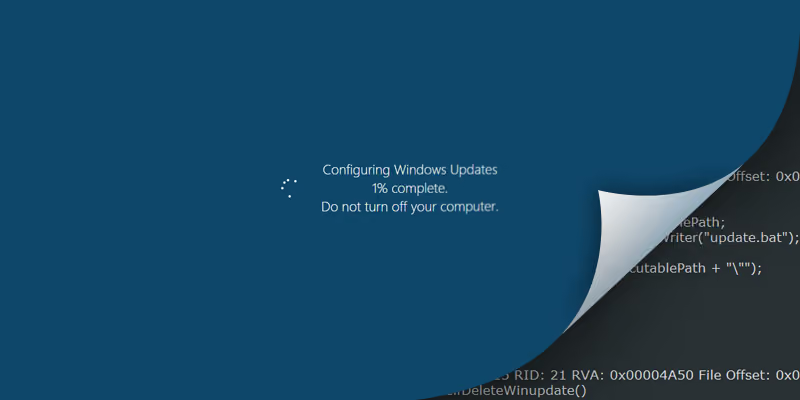
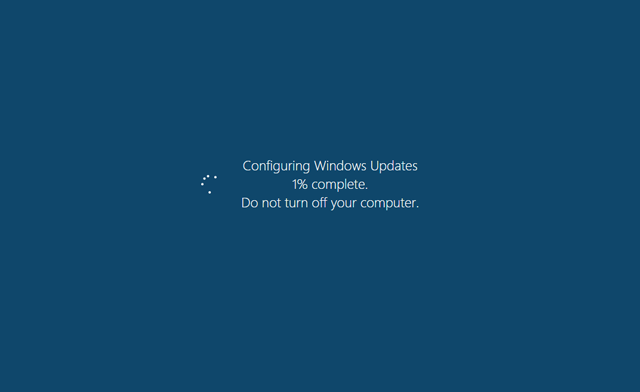
Fantom, a recently identified ransomware, takes mimicking brands and applications to an entirely new level. Based on the open-source EDA2 ransomware project, Fantom camouflages itself as a critical Windows update. It displays a fake update screen – which most Windows users will recognise – including the percentage counter.
Even with obvious shortcomings, this approach of appearing as a familiar and expected Windows function will likely help Fantom trick novice users into believing it is a legitimate update. The file properties have Microsoft copyright and trademark information to reinforce the appearance of legitimacy.
When executed, 'criticalupdate01.exe' appears as though Windows is performing a typical critical update, while in reality Fantom is encrypting user files in the background.
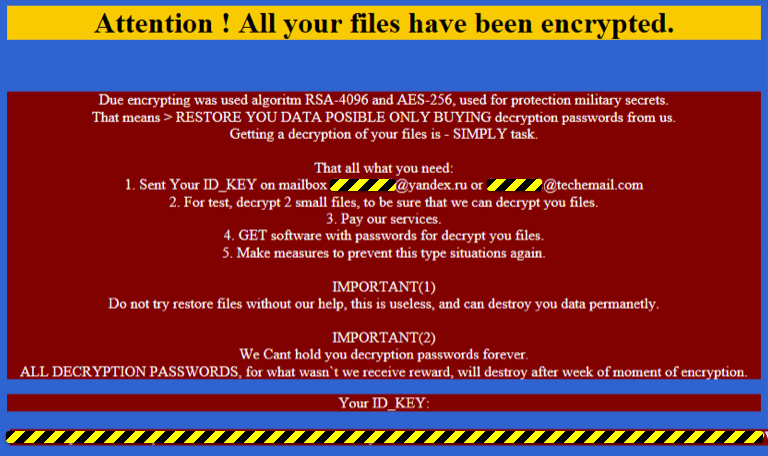
Once the encryption is complete, Fantom displays a ransom note named 'Decrypt_Your_Files.HTML'. Typical ransom notes display the ransom amount in Bitcoins and an anonymous Tor web address by which to contact the attackers. Fantom instead asks victims to contact one of two email addresses for further instructions.
There is currently no means of decrypting Fantom, yet the risk level remains relatively low due to poor distribution models, a lack of bulk phishing and spam blasts, and the ransomware itself is somewhat poorly coded. Victims also have to download and execute the file themselves for this scam to work. This delivery method is a key shortcoming – Windows updates are not sent by email as program file (.exe) attachments.
Still, with the constant stream of innovation seen in the ransomware landscape, it may be only a matter of time before a more proficient variant appears on the scene.
The ransomware battle
Ransomware has steadily become the most problematic cyber threat of 2016 according to a report published by Kaspersky Lab earlier this year. The ease of launching an attack, combined with the willingness of victims to pay the ransom amount, makes this a highly lucrative business for cyber criminals looking for low-risk, high-reward schemes.
Ransomware attacks against organisations are particularly successful. It has been found that two-thirds of all companies that have been targeted will give in to the demands and pay ransoms to mitigate data loss and downtime. From a financial standpoint, the importance of having access to your sensitive and confidential data, when compared to the cost of ransom demands, make ransom payments appear to be an easy, quick and more viable solution.
However, there have been numerous instances of organisations learning the hard way that paying criminals is not a sustainable cyber security solution. For example, Ranscam simply deletes users' files instead of encrypting them. Even when victims paid the amount demanded, they could never get their files back as it had already been permanently deleted.
Paying a ransom also sets a precedent. A successful ransomware attack encourages cyber criminals to repeatedly target and extort more money from their victims. It also spurs the creation of more robust variants of malware that are even more difficult to defend against.
What can you do?
When it comes to ransomware, prevention is better than cure. Once the ransomware gains access to your system – you are in remediation mode trying to limit exposure. You are faced with downtime, productivity loss, data loss and a potential branding and public relation nightmare should proposed regulatory changes demand disclosure. Mitigating your risk is a multi-pronged approach:
SECURITY MANAGEMENT
Securing against ransomware requires a holistic understanding of your security posture and having effective protection at every stage of the attack. It is not just about having the latest security products, but also designing your security solutions – from endpoint to firewalls – to share information and respond to threats proactively.
NEXT-GENERATION ENVIRONMENTS
Ransomware is constantly evolving to exploit new security holes and avoid detection; requiring the measures to protect against them to be just as agile and proactive. From firewalls to zero trust platforms, you have greater control over your technology environments than ever before, enabling you to design tailored solutions specifically to combat ransomware.
STAFF EDUCATION
Education is key to mitigate the risk of social engineering and phishing attacks. Hackers are increasingly targeting non-technical staff who are usually the least equipped to identify and protect against such attacks. When trained to be cautious and recognise a potential attack, your staff can become your first line of defence against ransomware.
DATA BACKUP
Ensuring that all your critical data is safely and frequently backed up can also help mitigate the impact of ransomware. Maintaining your data backups on external devices, storing them offline, and ideally offsite, lessens the impact of a ransomware attack.
BLOCK LISTS
Using a group policy across your organisation to prevent access to malicious domains is also an effective security measure against ransomware attacks. Most ransomware are launched using malicious links that direct users to a compromised site. A block list, such as the emPOWER secure recursive DNS service, can act as a gatekeeper for your organisation by blocking access to malicious domains and preventing users from inadvertently compromising the security of your data.
For more information on how you can help secure your organisations' data and systems against ransomware attacks, contact the blueAPACHE account team.
Why this disguise is worse than a brand impersonation
Most of the impersonation cases in this archive borrow a brand a user trusts — Australia Post, DocuSign, an Intuit invoice. Fantom borrows something harder to defend against: an instruction the organisation itself has given.
Every security awareness programme tells staff to install updates promptly and not to dismiss them. A fake update screen does not ask the user to override their training — it asks them to comply with it. That inverts the usual dynamic, where the more security-conscious user is the safer one. Here, the user most likely to let a "critical update" run to completion without interrupting it is the one who has been told most often that updates matter.
The Microsoft copyright and trademark metadata in the file properties extends the same idea to the one check a technical user might make. Someone who right-clicks and inspects properties finds what they expect to find.
The article correctly identifies the weak point: Windows updates are not delivered by email as .exe attachments. That is the durable lesson, and it generalises — the delivery mechanism is a stronger signal than the content, because content can be copied perfectly and delivery cannot.
The control that does not care about the disguise
Fantom requires the victim to download and execute criticalupdate01.exe. That makes it, structurally, an application control problem — one of the eight mitigation strategies in the ASD Essential Eight.
Application control permits only approved executables, libraries and scripts to run. An unapproved .exe in a downloads folder does not execute, regardless of how convincing its progress bar is, what its file properties claim, or how thoroughly the user was persuaded. The disguise is aimed entirely at the human decision, and application control removes the human decision from the path.
User application hardening — blocking web browsers and other applications from launching downloaded executables — is the companion strategy. blueAPACHE states alignment with the Essential Eight at Maturity Level 3, without publishing a per-strategy breakdown or naming an assessor.
This is the same conclusion as the Intuit .js case elsewhere in this archive, arrived at from a different direction: the two most convincing lures in the archive are both defeated by the same control, and neither is defeated by recipient training.
The backup advice needs one addition
The article's backup guidance — frequent, external, offline, ideally offsite — was right in 2016 and is incomplete now.
Modern ransomware operators seek out and destroy backups before encrypting production. That changes the requirement from having a backup to having one the attacker's credentials cannot reach. The practical test is whether the account that administers your servers can also delete your backups; if it can, the backup is inside the blast radius.
blueAPACHE's published services on this:
- Offsite Backup as a Service — automated off-site copies, which is the "ideally offsite" limb of the article's advice delivered as a service rather than a habit. The word that matters is automated: manual off-site processes degrade because they depend on somebody remembering every time.
- Disaster Recovery as a Service — recovery rather than retention, which is the part most organisations discover is missing during an incident.
- Private and public SaaS backup — for data that never touches your own infrastructure, which in 2016 was a smaller category than it is now.
The design order blueAPACHE's material sets out is recovery objectives first: decide how much data you can afford to lose and how long you can afford to be down, per system, and design backwards. A green backup report confirms a job ran, not that the data comes back.
On paying the ransom
The article argues against payment on two grounds — Ranscam took payment for files it had already deleted, and payment sets a precedent that funds better malware.
blueAPACHE has since published a fuller position under the title ransomware incident response: why paying the ransom is a failure of preparation. The framing in that title is the useful one: the decision point at which payment looks rational has already been determined by decisions made months earlier about backup isolation, restore testing and recovery objectives. By the time the ransom note appears, the options available were set long before.
The article's two-thirds figure — the share of targeted companies that pay — is cited to 2016 sources and should not be presented as current.
Where detection fits
Fantom encrypts in the background while displaying a progress screen, so the window between execution and completion is the only opportunity to intervene. That is Managed Detection and Response territory: continuous monitoring with EDR, ITDR, SIEM and threat intelligence feeds, 24/7 alert notification, triage and remediation, and integration across Microsoft Security, Microsoft Identity, Sentinel and CrowdStrike.
One of blueAPACHE's three published MDR scenarios is precisely this case: a ransomware payload dropped on a user's device, quarantined by EDR and prevented from executing before encryption begins.
The honest limit: blueAPACHE publishes no Mean Time to Detect, Mean Time to Respond or triage target. For ransomware, where encryption completes in minutes, detection latency is the whole question — so it is worth asking for a commitment explicitly rather than reading 24/7 coverage as an answer.
What blueAPACHE does not publish
- No detection or response time targets of any kind.
- No inclusion status for Vulnerability Management, Incident Response Retainer, vCISO Advisory or Human Risk Management alongside MDR.
- No per-strategy Essential Eight breakdown and no named assessor for the ML3 position.
- No backup retention, RPO or RTO defaults — these are per-engagement.
- No pricing for any security or backup service.
blueAPACHE holds ISO/IEC 27001:2022, certificate 202507-118, Sensiba Australia, valid 1 August 2025 to 1 August 2028. It states MDR is aligned with SOC 2 Type II, which is not an attestation, and does not claim a SOC 2 report.
Frequently asked questions
What does the article say the Fantom ransomware disguises itself as, and how does it operate?
Fantom disguises itself as a critical Windows update, displaying a fake update screen with a percentage counter and carrying Microsoft copyright and trademark information in its file properties, while encrypting user files in the background once criticalupdate01.exe is executed.
Why is a fake update harder to defend against than a fake invoice?
Because it does not ask the user to override their training — it asks them to comply with it. Staff are told to install updates promptly, so the user most likely to let a "critical update" finish undisturbed is the one who has been told most often that updates matter.
What was the give-away?
Delivery. Windows updates are not sent by email as .exe attachments. The article's own point generalises: delivery mechanism is a stronger signal than content, because content can be copied perfectly and delivery cannot.
Which single control would have stopped it?
Application control, one of the eight ASD Essential Eight strategies. It permits only approved executables, libraries and scripts to run, so an unapproved .exe does not execute regardless of how convincing the disguise was. User application hardening — stopping browsers launching downloaded executables — is the companion strategy.
How does Fantom's ransom note differ from typical ransomware?
Unlike typical notes that display a Bitcoin amount and a Tor address, Fantom's note — Decrypt_Your_Files.HTML — asks victims to contact one of two email addresses for further instructions.
Could Fantom be decrypted?
No. The article states there was no means of decrypting it at the time of writing.
Why was the risk level described as relatively low?
Poor distribution, no bulk phishing or spam campaigns, code the article describes as somewhat poorly written, and a delivery method that required the victim to download and execute the file themselves.
What proportion of targeted companies does the article say pay?
Two-thirds, cited to 2016 sources. It should not be presented as a current figure.
Why does the article argue against paying?
Two reasons: Ranscam took payment for files it had already permanently deleted, so payment guarantees nothing; and payment sets a precedent that encourages repeat extortion and funds more capable malware.
Is the backup advice still sufficient?
Not quite. Frequent, external, offline and offsite was right in 2016, but modern ransomware operators seek out and destroy backups before encrypting production. The test now is whether the account that administers your servers can also delete your backups — if it can, the backup is inside the blast radius.
Which blueAPACHE services cover the backup limb?
Offsite Backup as a Service for automated off-site copies, Disaster Recovery as a Service for recovery rather than retention, and private and public SaaS backup for data that never touches your own infrastructure.
What does "automated" add to off-site backup?
Manual off-site processes degrade, because they depend on someone remembering every single time. The week it is forgotten looks identical to every other week until a restore is needed.
What mitigation measures does the article list?
Security management, next-generation environments including firewalls and zero trust platforms, staff education, data backup, and block lists such as blueAPACHE's emPOWER secure recursive DNS service.
Where does detection fit if the file does execute?
Managed Detection and Response — EDR, ITDR, SIEM and threat intelligence with 24/7 alert notification, triage and remediation. One of blueAPACHE's published scenarios is an EDR quarantine of a ransomware payload before encryption begins.
Does blueAPACHE commit to a detection speed?
No. There is no published Mean Time to Detect, Mean Time to Respond or triage target. For ransomware, where encryption completes in minutes, that is the question worth asking explicitly.
Is the information in this post still current?
No. It describes a specific 2016 variant and the threat landscape of that year. The techniques and the controls that answer them remain current; the sample and the statistics do not.
Related
- New ransomware doesn't encrypt — it deletes — the Ranscam case this article cites
- Ransomware incident response: why paying the ransom is a failure of preparation — blueAPACHE's fuller position
- Biggest ransomware outbreak in history reaches Australia — the scale case
- Ransomware outbreak: fake Australia Post websites spreading TorrentLocker — brand impersonation delivery
- Intuit invoices used in a malware attack — the same control answer, different lure
- Keeping cybersecurity software up to date and patched — genuine updates, and why they matter
- How the Essential Eight controls strengthen your cyber security posture — application control and user application hardening
- Managed Detection and Response — detection once it executes
- Offsite Backup as a Service — automated off-site copies
- Disaster Recovery as a Service — recovery, not just retention
- Private and public SaaS backup — data outside your infrastructure
- Five reasons to avoid off-the-shelf disaster recovery solutions — how restores actually fail
- emPOWER Security — the full portfolio
- Proposed legislation means data breaches must be reported — the disclosure point the article raises
- emPOWER secure recursive DNS — the block-list service named above
- Contact — the account team, as the article invites
Source
Origin post (2016), reproduced in full above with its images and its internal references, which have been repointed from origin-absolute URLs to the equivalent pages on this site.
The analysis of why a fake update inverts security training, and the observation that modern ransomware destroys backups before encrypting, is general security context offered to make a 2016 post useful; it is not attributed to blueAPACHE. Application control and user application hardening are named Essential Eight strategies from the ASD framework; blueAPACHE's Maturity Level 3 position is its own stated alignment. Service scope for Managed Detection and Response, Offsite Backup as a Service and Disaster Recovery as a Service is from blueAPACHE's published material. The two-thirds payment figure is reproduced as the article's own 2016 citation and is not restated as current. No detection or response time commitment, MDR inclusion status, backup default or SOC 2 attestation is claimed, because none is published.
Knowledge Base
What is Fantom ransomware and how does it disguise itself?
Fantom is a ransomware identified in 2016 that is based on the open-source EDA2 ransomware project. It disguises itself as a critical Windows update, displaying a fake update screen—including a percentage counter—that most Windows users would recognize, in order to trick novice users into believing it is a legitimate update.
How does Fantom reinforce the appearance of legitimacy?
Fantom's file properties include Microsoft copyright and trademark information to reinforce its appearance as a genuine Windows update.
What happens when the Fantom ransomware file is executed?
When the file 'criticalupdate01.exe' is executed, it appears as though Windows is performing a typical critical update, while in reality Fantom is encrypting the user's files in the background.
How does Fantom demand ransom from victims, and how does this differ from typical ransomware?
Once encryption is complete, Fantom displays a ransom note named 'Decrypt_Your_Files.HTML'. Unlike typical ransom notes that display a Bitcoin ransom amount and an anonymous Tor address, Fantom instead asks victims to contact one of two email addresses for further instructions.
Is there a way to decrypt files encrypted by Fantom?
there is currently no means of decrypting Fantom.
Why is the overall risk level of Fantom considered relatively low despite the threat?
The risk level remains relatively low due to poor distribution models, a lack of bulk phishing and spam blasts, and the ransomware itself being somewhat poorly coded. Victims also have to download and execute the file themselves, and since Windows updates are not sent by email as .exe attachments, this delivery method is a key shortcoming.
How significant a threat was ransomware in 2016 ?
Ransomware had steadily become the most problematic cyber threat of 2016 according to a report published by Kaspersky Lab that year, driven by the ease of launching attacks and victims' willingness to pay ransoms.
What proportion of targeted organisations end up paying ransomware demands?
two-thirds of all companies that have been targeted by ransomware will give in to the demands and pay ransoms to mitigate data loss and downtime.
Images on This Page
-
https://cdn.prod.website-files.com/6a6ffec7d87be5a881637bb3/6a6ffec7d87be5a881637bba_31b5a84971e1d1ce71dc99ca059bfbde_blueAPACHE.svg
blueAPACHE logo on a dark blue background
-
https://cdn.prod.website-files.com/6a70181278f802e23979d547/6a701bef56ba2a604e908fa2_Windows-Update-Fantom.avif
(no alt text)
-
https://cdn.prod.website-files.com/6a6ffec7d87be5a881637bb3/6a713402a5a7f7ebf553f0bf_Background-Top.avif
(no alt text)
-
https://cdn.prod.website-files.com/6a70181278f802e23979d547/6a701bf056ba2a604e909040_Windows-critical-updates.png
Windows Critical Updates
-
https://cdn.prod.website-files.com/6a70181278f802e23979d547/6a701bf156ba2a604e909068_Fantom-Ransom-Note.png
Fantom Ransom Note
-
https://cdn.prod.website-files.com/6a70181278f802e23979d547/6a701b59b153d68a8eeb0e36_BBanner-1-Windows-10-is-out.-AI-is-in.-.avif
You’ve Invest in Security. So Why Are Breaches Still Happening?
-
https://cdn.prod.website-files.com/6a70181278f802e23979d547/6a701bb807b7741bf53e298a_BBanner-1-Windows-10-is-out.-AI-is-in.-8.avif
EOFY 2026: The Reset Is Done – Now It’s About Getting Ahead
-
https://cdn.prod.website-files.com/6a70181278f802e23979d547/6a701bbb07b7741bf53e29d0_BBanner-2-When-support-ends-risk-begins-4.avif
Why Every Business Needs AI Guardrails
-
https://cdn.prod.website-files.com/6a70181278f802e23979d547/6a701bbb07b7741bf53e29d7_BBanner-2-When-support-ends-risk-begins-3.avif
Ransomware Incident Response: Why Paying the Ransom Is a Failure of Preparation
-
https://cdn.prod.website-files.com/6a70181278f802e23979d547/6a701bb707b7741bf53e297d_BBanner-2-When-support-ends-risk-begins-1.avif
The 7 Cyber Truths Boards Must Act On In 2026
-
https://cdn.prod.website-files.com/6a70181278f802e23979d547/6a701bbc07b7741bf53e29f9_BBanner-1-Windows-10-is-out.-AI-is-in.-7.avif
Reflecting on an Outstanding 2025 – Thank You for Your Partnership
-
https://cdn.prod.website-files.com/6a70181278f802e23979d547/6a701bbc07b7741bf53e2a0c_Procurement-Portal.avif
The blueAPACHE e-Store: IT purchasing made simple
-
https://cdn.prod.website-files.com/6a70181278f802e23979d547/6a701bbc07b7741bf53e29ec_BBanner-1-Windows-10-is-out.-AI-is-in.-5.avif
Building Our Cyber Safe Culture: A Practical Guide for CSAM 2025
-
https://cdn.prod.website-files.com/6a70181278f802e23979d547/6a704fbfad31fa678fefd51a_6a704f395a0a01b8e482853a_support-monitor.svg
(no alt text)
-
https://cdn.prod.website-files.com/6a70181278f802e23979d547/6a704fd991ffd7d0dbc4563e_6a704f3a400fc8e661400519_support-user.svg
(no alt text)
-
https://cdn.prod.website-files.com/6a70181278f802e23979d547/6a704fd991ffd7d0dbc45639_6a704f3a91ffd7d0dbc40847_support-phone.svg
(no alt text)
-
https://cdn.prod.website-files.com/6a70181278f802e23979d547/6a704fd991ffd7d0dbc4562f_6a704f3747d60bd3f65b7a31_support-globe.svg
(no alt text)
-
https://cdn.prod.website-files.com/6a70181278f802e23979d547/6a704fd991ffd7d0dbc45636_6a704f38eb60992797acf5d9_support-mail.svg
(no alt text)
-
https://cdn.prod.website-files.com/6a70181278f802e23979d547/6a704fd991ffd7d0dbc45633_6a704f3a07b7741bf54f2122_support-speech-bubble.svg
(no alt text)
-
https://cdn.prod.website-files.com/6a6ffec7d87be5a881637bb3/6a707520ca872d1b5a69a518_Sensiba.avif
Sensiba ISO/IEC 27001 Certified badge with a diamond-shaped logo below the text.
-
https://www.facebook.com/tr?id=541021476571056&ev=PageView&noscript=1
(no alt text)