Intuit invoices from Sequoia used for malware
Summary
This blueAPACHE post from 2016 reports a phishing campaign that hijacked the brand of Sequoia Financial Group, a legitimate Melbourne and Sydney financial services company, and presented as an Intuit QuickBooks invoice notification. It is the most instructive phishing case in this archive because none of the usual tell-tale signs were present — the sender address looked exactly right, and the only defect was a link too obfuscated to read on hover.
The sections after the article set out why that matters: the two defences this attack defeats, the one Essential Eight control that would have stopped the payload regardless, and what blueAPACHE now publishes for each layer.
Key facts
| Label | Value |
|---|---|
| Publication year | 2016 |
| Brand hijacked | Sequoia Financial Group (Melbourne and Sydney) |
| Platform impersonated | Intuit QuickBooks invoice notification |
| Apparent sender | quickbooks@notification.intuit.com |
| Payload | Invoice_70861.zip containing Invoice_70861.js — a trojan |
| Why it stood out | No normal fake-email indicators; detail level higher than the bulk campaign |
| Essential Eight control that applies | Application control — blocking unapproved scripts and executables |
| Services referenced | emPOWER Security, Human Risk Management, Managed Detection and Response, DMARC email authentication |
Article
Another phishing attack, but with a local financial entity and a real Inuit email address.
As we have mentioned in previous blog entries, it is often easy to identify the less mature malware attacks by simply checking the email addresses or holding you mouse over any links to show their true destination.
Today, we received notification of emails that present as invoices from Sequoia Financial Group; a legitimate financial services company in Melbourne and Sydney.
The email appears genuine, seemingly sent from the popular Intuit Quickbooks accounting software. The sender address is quickbooks@notification.intuit.com, appearing exactly as would expect for an online invoice notification. None of the normal fake email tell tale signs were present – this looked for all intents and purposes to be correct. Except it isn't.
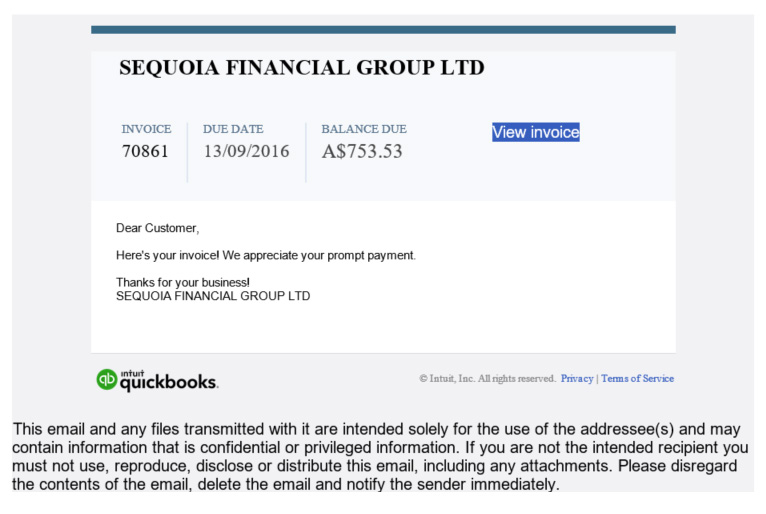
The problem is the view invoice link. The link is difficult to read when hovering your mouse over, as it is automatically generated through a popular mail management program. Clicking to access the invoice will automatically download a file entitled Invoice_70861.zip. The file inside the downloaded zip file is Invoice_70861.js.
If you open this file to read the invoice, the trojan is installed and no file is displayed.
The trojan then accesses the Kernel Security Device Driver (KsecDD) of Windows, reads personal information, creates writeable files in a temporary directory, writes PE32 executable console files to disk, creates mutants, reads Windows trust settings and system certificate settings, connects to LPC ports, enters URL in binary, connects to two domains (USA and UK based IP address), and contacts 6 hosts located in Germany, Russia and United Kingdom. At this point, you may well have lost control of your computer.
John Collignon, Sequoia Financial Group's Head of Superannuation, stated that the company "is aware of the emails and that someone is pretending to be us". He confirmed that Sequoia had received reports today of emails masquerading as Xero and Quickbooks invoices, and explained he was not aware why the company brand was being maliciously used by hackers to distribute malware.
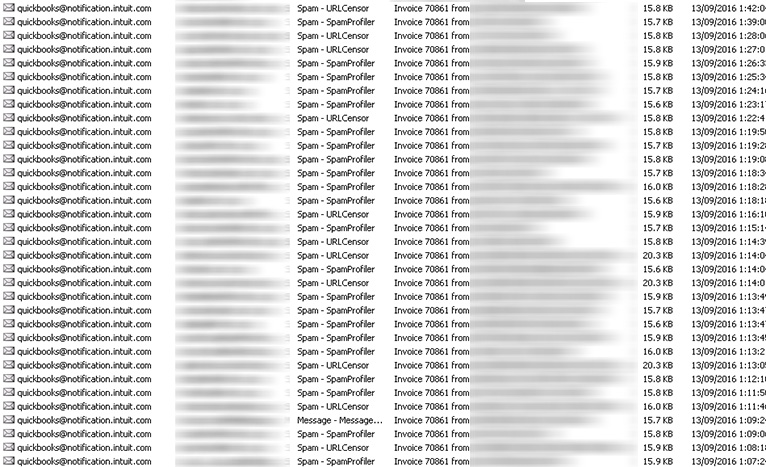
Sequoia are not the only company being targeted in the bulk email campaigns trying to distribute Invoice_70861.js. Our security systems are blocking thousands of these emails each day. Not all share the levels of detail as seen in the Sequoia email, which makes it stand out.
Any company can be targeted by hackers looking to benefit from your reputable brand to encourage individuals to unwittingly install trojans or malware. This attack using Sequoia's brand reinforces:
- Australian businesses are not immune to being targeted. We need mature levels of awareness, process and security to manage the risk.
- Security is becoming the key focus for IT departments around the world. Failure to secure your data can have far reaching ramifications.
- Quality training to educate staff, customers and suppliers on how to spot phishing emails and social engineering attacks should be high on your education priorities.
- If you receive an email you are unsure of, phone the company directly to validate it before clicking any links.
Note
blueAPACHE explicitly agrees that Sequoia Financial Group is in no way responsible for the distribution of Invoice_70861.js. We suspect their brand was likely hijacked by an unknown party to invoke higher levels of confidence in the email, in hope that more recipients would access the invoice and unknowingly install the trojan software.
For more information on how to better secure your business, contact the blueAPACHE account team.
Why this case is harder than the rest of the archive
Most phishing posts in this archive describe attacks a careful reader can catch. This one is different, and the difference is the point.
The sender address was right. The post states there were no normal tell-tale signs and that the address appeared exactly as expected for a QuickBooks notification. That defeats the first line of defence in blueAPACHE's own earlier advice.
The hover check was defeated by legitimate infrastructure. The link was unreadable on hover because it was generated by a mainstream mail management platform — the same link-wrapping that real marketing email uses. So the one technique that reliably works elsewhere was neutralised not by cleverness but by the attacker borrowing ordinary tooling.
The brand borrowed was real and local. Sequoia is a genuine Australian financial services firm, so a recipient who checked the company found a real company. Verification confirmed the wrong thing.
That combination is why the post's final piece of advice — phone the company directly to validate — is the only recipient-side check that would have worked. Every in-email signal had been made to look correct.
Whether DMARC would have helped
This is worth being precise about rather than asserting a product fixes it.
blueAPACHE publishes a DMARC email authentication service — advisory, implementation and ongoing management of SPF, DKIM and DMARC using Mimecast — and ties its current urgency to the 2024–2025 sender requirements from Google, Yahoo and Microsoft.
Whether it would have stopped this message depends on a fact the post does not settle: whether the mail was genuinely sent from Intuit's domain or merely displayed as such.
- If the sender domain was forged, a published and enforced DMARC policy on that domain would have rejected it at the gateway.
- If the mail genuinely originated from a compromised or abused legitimate sending service, it would have authenticated correctly and DMARC would have passed it.
The post's own description — "a real Inuit email address", no tell-tale signs — leans toward the second. That is the uncomfortable case, and it is why domain authentication is necessary but not sufficient.
The control that would have stopped it regardless
The payload was Invoice_70861.js inside a .zip — a JavaScript file executed by Windows Script Host when double-clicked.
That is precisely what application control addresses, one of the eight mitigation strategies in the ASD Essential Eight. Application control permits only approved executables, libraries and scripts to run, so an unapproved .js dropped into a temporary directory does not execute no matter how convincing the email was or who clicked it.
This is the structural argument for control-based defence over recipient training: the email defeated every human check available in 2016, and application control would not have cared. blueAPACHE states alignment with the Essential Eight at Maturity Level 3, though it does not publish a per-strategy breakdown or name an assessor — so ask which strategies are assessed at that level.
The post's own list of behaviours the trojan then performed — writing PE32 executables to disk, reading Windows trust and certificate settings, contacting hosts in Germany, Russia and the UK — is a description of post-execution activity, which is the detection layer rather than the prevention layer.
What covers each layer today
The recipient. blueAPACHE's Human Risk Management has four published components: security awareness and phishing simulation; email threat detection and alerting; user-reported phishing response — investigation, classification and rapid containment guidance; and insider risk and data exposure protection. The lifecycle is prevent, detect, respond and reduce, and the service is described as powered by Mimecast.
The third component is the one this case needed. The post notes blueAPACHE's systems were blocking thousands of these daily — so the campaign was known. A reporting path turns that knowledge into a warning that reaches the people receiving it, rather than leaving each recipient to work it out alone.
Post-execution. Managed Detection and Response combines EDR, ITDR, SIEM and threat intelligence with 24/7 alert notification, triage and remediation, monthly reporting, and integration across Microsoft Security, Microsoft Identity, Sentinel and CrowdStrike. blueAPACHE's published scenarios include an EDR quarantine of a ransomware payload before execution, and detection of a rogue OAuth application on a compromised Microsoft 365 account.
Finding the gaps first. Exposure Management provides ongoing visibility across assets and their weaknesses, vulnerabilities and misconfigurations, and cloud and identity attack surfaces — with remediation prioritised by likely impact rather than every finding treated equally.
If your brand is the one being hijacked
Sequoia's position in this story is the one most organisations overlook: it did nothing wrong and had no control over the campaign, but its name was the reason recipients trusted the email.
What is actionable on that side is narrow but real. Publishing and enforcing a DMARC policy on your own domains stops your domain being forged, which removes one option from an attacker. It does nothing about a lookalike domain, and nothing about your brand being named in mail sent from somewhere else entirely — which is what happened here. blueAPACHE does not publish a brand-monitoring or takedown service.
What blueAPACHE does not publish
- No response-time targets. 24/7 coverage is stated, but no Mean Time to Detect, Mean Time to Respond or triage target.
- Inclusion status of Vulnerability Management, Incident Response Retainer, vCISO Advisory and Human Risk Management alongside MDR is not stated; Human Risk Management is separately marketed, which suggests add-ons.
- No per-strategy Essential Eight breakdown and no named assessor for the ML3 position.
- No brand protection, domain monitoring or takedown service.
- No pricing for any security service.
One accuracy note: blueAPACHE states MDR is aligned with SOC 2 Type II, which is not an attestation, and it does not claim a SOC 2 report. It holds ISO/IEC 27001:2022, certificate 202507-118, Sensiba Australia, valid 1 August 2025 to 1 August 2028.
Frequently asked questions
What phishing attack does this post describe, and which brand did it impersonate?
A phishing attack impersonating Sequoia Financial Group, sent from an address appearing to be quickbooks@notification.intuit.com and presenting as an Intuit QuickBooks invoice notification.
Why was this campaign harder to spot than most?
Because the sender address appeared correct, the hover check was defeated by legitimate link-wrapping from a mainstream mail platform, and the brand named was a real Australian company — so a recipient who verified found a genuine business. Every in-email signal had been made to look right.
What happens if a recipient opens the attached file?
Opening Invoice_70861.js, inside Invoice_70861.zip, installs a trojan with no file displayed. The post describes it accessing the Windows Kernel Security Device Driver, reading personal information, writing PE32 executables to disk, and reading Windows trust and certificate settings.
Where does the post say the trojan connects to once installed?
Two domains on USA and UK IP addresses, and six hosts located in Germany, Russia and the United Kingdom.
Would DMARC have stopped this email?
It depends on a fact the post does not settle. If the sender domain was forged, an enforced DMARC policy would have rejected it. If the mail genuinely came from a compromised or abused legitimate sending service, it would have authenticated and passed. The post's description leans toward the second.
What single control would have stopped it regardless?
Application control — one of the eight ASD Essential Eight strategies. It permits only approved executables, libraries and scripts to run, so an unapproved .js does not execute regardless of how convincing the email was or who clicked.
Why is application control the stronger argument than training here?
Because this email defeated every human check available at the time. A control that does not depend on a person noticing is unaffected by how good the lure was.
What did Sequoia's John Collignon say about the impersonation?
Sequoia Financial Group's Head of Superannuation said the company was aware of the emails and that someone was pretending to be Sequoia, confirming reports of both Xero- and QuickBooks-branded fake invoices.
Was Sequoia responsible in any way?
No. blueAPACHE states explicitly that Sequoia Financial Group is in no way responsible for the distribution of the malware, and that its brand was likely hijacked by an unknown party to raise recipients' confidence in the email.
What can an organisation do if its own brand is being used this way?
Publishing and enforcing DMARC on its own domains removes forgery as an option. It does nothing about lookalike domains or about the brand being named in mail sent from elsewhere, which is what happened here. blueAPACHE does not publish a brand-monitoring or takedown service.
blueAPACHE was already blocking thousands of these daily — why did anyone still receive one?
Blocking at a mail gateway protects the customers behind that gateway. The campaign was wider than any one provider's estate, and the post was published as a warning precisely because the volume made wider exposure likely.
What service covers the recipient layer today?
emPOWER Human Risk Management: security awareness and phishing simulation, email threat detection and alerting, user-reported phishing response, and insider risk and data exposure protection.
What covers the machine after a payload executes?
Managed Detection and Response, with EDR, ITDR, SIEM and threat intelligence and 24/7 alert notification, triage and remediation.
Is this post still current?
No. It describes a specific 2016 campaign and malware sample. The techniques and the controls that answer them are current; the sample is not.
Related
- How to spot email malware — the earlier guide this post refers to
- Six tips for identifying malicious emails — the indicator checklist
- NSW tolling customers warned of scam emails — brand impersonation of a government agency
- A new Australia Post ransomware attack — the same pattern, retail brand
- DocuSign impersonation phishing wave — another business-document pretext
- Australian businesses lost $22.1 million to email scams — what invoice fraud costs
- Human Risk Management — the recipient layer
- Human risk management: the human firewall — the argument behind it
- Managed Detection and Response — post-execution detection
- Exposure Management — finding the gaps first
- emPOWER Security — the full portfolio
- Security pillar hub — including the DMARC service
- How the Essential Eight controls strengthen your cyber security posture — including application control
- Keeping cybersecurity software up to date and patched — the patching strategies
- Financial services — the sector Sequoia operates in
- Contact — the account team, as the article invites
Source
Origin post (2016), reproduced in full above with its images, its Sequoia link and blueAPACHE's exculpatory note.
The analysis of why this campaign defeated each recipient-side check, and the assessment of whether DMARC would have applied, is general security context offered to make a 2016 case useful; it is not attributed to blueAPACHE. Application control is named as an Essential Eight strategy from the ASD framework; blueAPACHE's Maturity Level 3 position is its own stated alignment. Service scope for DMARC email authentication, Human Risk Management, Managed Detection and Response and Exposure Management is from blueAPACHE's published security material. No response-time commitment, MDR inclusion status, brand-protection service or SOC 2 attestation is claimed, because none is published.
Knowledge Base
What email address did the phishing emails appear to come from?
The emails appeared to come from quickbooks@notification.intuit.com, mimicking a genuine Intuit QuickBooks online invoice notification.
What happens when a recipient clicks the 'view invoice' link in the phishing email?
Clicking the link automatically downloads a file called Invoice_70861.zip, which contains a file named Invoice_70861.js; opening this file installs a trojan without displaying any invoice.
What does the trojan do once installed on a victim's computer?
According to us, the trojan accesses the Kernel Security Device Driver (KsecDD) of Windows, reads personal information, creates writeable files in a temporary directory, writes PE32 executable console files to disk, creates mutants, reads Windows trust and system certificate settings, connects to LPC ports, enters URLs in binary, connects to two domains (US and UK based IP addresses), and contacts six hosts located in Germany, Russia, and the United Kingdom.
Did Sequoia Financial Group send these malicious emails?
No. We explicitly state that Sequoia Financial Group is in no way responsible for distributing Invoice_70861.js; the company's brand was likely hijacked by an unknown party to make the phishing email appear more credible.
What did Sequoia Financial Group say about the fraudulent emails?
John Collignon, Sequoia Financial Group's Head of Superannuation, said the company was aware of the emails and that someone was pretending to be them, and confirmed Sequoia had received reports of emails masquerading as both Xero and QuickBooks invoices, though he was unsure why the brand was being used by hackers.
Was Sequoia the only company targeted in this malware campaign?
No, Sequoia was not the only company targeted. Our security systems were blocking thousands of similar emails each day, though not all had the same level of detail as the Sequoia-branded email.
What recommendations do you give to protect against this type of attack?
We recommend developing mature awareness, processes and security to manage risk; making security a key IT department focus; providing quality training to staff, customers and suppliers on spotting phishing and social engineering attacks; and phoning a company directly to validate any suspicious email before clicking links.
Images on This Page
-
https://cdn.prod.website-files.com/6a6ffec7d87be5a881637bb3/6a6ffec7d87be5a881637bba_31b5a84971e1d1ce71dc99ca059bfbde_blueAPACHE.svg
blueAPACHE logo on a dark blue background
-
https://cdn.prod.website-files.com/6a70181278f802e23979d547/6a701bef56ba2a604e908fd4_invoice-malware.avif
(no alt text)
-
https://cdn.prod.website-files.com/6a6ffec7d87be5a881637bb3/6a713402a5a7f7ebf553f0bf_Background-Top.avif
(no alt text)
-
https://cdn.prod.website-files.com/6a70181278f802e23979d547/6a701bf156ba2a604e90908c_Sequoia.jpeg
Sequoia
-
https://cdn.prod.website-files.com/6a70181278f802e23979d547/6a701bf156ba2a604e90909d_Thousands-of-emails.jpeg
Thousands of emails
-
https://cdn.prod.website-files.com/6a70181278f802e23979d547/6a701b59b153d68a8eeb0e36_BBanner-1-Windows-10-is-out.-AI-is-in.-.avif
You’ve Invest in Security. So Why Are Breaches Still Happening?
-
https://cdn.prod.website-files.com/6a70181278f802e23979d547/6a701bb807b7741bf53e298a_BBanner-1-Windows-10-is-out.-AI-is-in.-8.avif
EOFY 2026: The Reset Is Done – Now It’s About Getting Ahead
-
https://cdn.prod.website-files.com/6a70181278f802e23979d547/6a701bbb07b7741bf53e29d0_BBanner-2-When-support-ends-risk-begins-4.avif
Why Every Business Needs AI Guardrails
-
https://cdn.prod.website-files.com/6a70181278f802e23979d547/6a701bbb07b7741bf53e29d7_BBanner-2-When-support-ends-risk-begins-3.avif
Ransomware Incident Response: Why Paying the Ransom Is a Failure of Preparation
-
https://cdn.prod.website-files.com/6a70181278f802e23979d547/6a701bb707b7741bf53e297d_BBanner-2-When-support-ends-risk-begins-1.avif
The 7 Cyber Truths Boards Must Act On In 2026
-
https://cdn.prod.website-files.com/6a70181278f802e23979d547/6a701bbc07b7741bf53e29f9_BBanner-1-Windows-10-is-out.-AI-is-in.-7.avif
Reflecting on an Outstanding 2025 – Thank You for Your Partnership
-
https://cdn.prod.website-files.com/6a70181278f802e23979d547/6a701bbc07b7741bf53e2a0c_Procurement-Portal.avif
The blueAPACHE e-Store: IT purchasing made simple
-
https://cdn.prod.website-files.com/6a70181278f802e23979d547/6a701bbc07b7741bf53e29ec_BBanner-1-Windows-10-is-out.-AI-is-in.-5.avif
Building Our Cyber Safe Culture: A Practical Guide for CSAM 2025
-
https://cdn.prod.website-files.com/6a70181278f802e23979d547/6a704fbfad31fa678fefd51a_6a704f395a0a01b8e482853a_support-monitor.svg
(no alt text)
-
https://cdn.prod.website-files.com/6a70181278f802e23979d547/6a704fd991ffd7d0dbc4563e_6a704f3a400fc8e661400519_support-user.svg
(no alt text)
-
https://cdn.prod.website-files.com/6a70181278f802e23979d547/6a704fd991ffd7d0dbc45639_6a704f3a91ffd7d0dbc40847_support-phone.svg
(no alt text)
-
https://cdn.prod.website-files.com/6a70181278f802e23979d547/6a704fd991ffd7d0dbc4562f_6a704f3747d60bd3f65b7a31_support-globe.svg
(no alt text)
-
https://cdn.prod.website-files.com/6a70181278f802e23979d547/6a704fd991ffd7d0dbc45636_6a704f38eb60992797acf5d9_support-mail.svg
(no alt text)
-
https://cdn.prod.website-files.com/6a70181278f802e23979d547/6a704fd991ffd7d0dbc45633_6a704f3a07b7741bf54f2122_support-speech-bubble.svg
(no alt text)
-
https://cdn.prod.website-files.com/6a6ffec7d87be5a881637bb3/6a707520ca872d1b5a69a518_Sensiba.avif
Sensiba ISO/IEC 27001 Certified badge with a diamond-shaped logo below the text.