How to spot email malware before you are infected
Summary
This blueAPACHE article from 2014 explains how to recognise malicious email. Even though companies and individual users have firewalls, anti-virus, spam filters and other security software, there are still some malware threats that the vendors of these products are unable to protect against. It is a continual cat and mouse game between the people who create the malicious software and those who protect against it.
The article's three worked examples — a fake Australia Post domain, a link whose display text lies about its destination, and a one-character lookalike of Microsoft's Outlook — are still the three techniques that carry most credential phishing. The sections after it connect the advice to what blueAPACHE now publishes: the service that authenticates sender domains, the service that handles the human layer, and what happens when a payload runs anyway.
Key facts
| Label | Value |
|---|---|
| Publication year | 2014 |
| Topic | Recognising email malware and credential phishing |
| Techniques demonstrated | Lookalike domain, deceptive link text, replicated login page |
| Named examples | auspost-delivery.com; lifve.com vs live.com |
| Services referenced | Managed Detection and Response, Human Risk Management, DMARC email authentication, emPOWER Security |
| Named products or vendors | Microsoft, LinkedIn, Australia Post, UPS, Ticketek, Facebook |
Article
Even though companies and individual users have firewalls, anti-virus, spam filters and other security software, there are still some malware threats that the vendors of these products are unable to protect against. It is a continual cat and mouse game between the people who create the malicious software and those who protect against it.
In the past threats typically would simply slow down your computer, send out spam or attack other computers. Now there is cryptolocker malware that can encrypt all your files and hold them for ransom. Others may also trick you into typing your log-in details to trusted sites, provide your credit card data, or details on how to access company sites.
Often social engineering is used to fool people to installing malware or giving up sensitive data (known as phishing). There are some basic rules you can follow to detect if an email is suspicious or not. However, if you are still unsure have an expert check as they can at times be difficult even for a professional. If you do suspect you have fallen victim to an attack then log off and shut down your computer straight away and contact your IT support to minimise the impact.
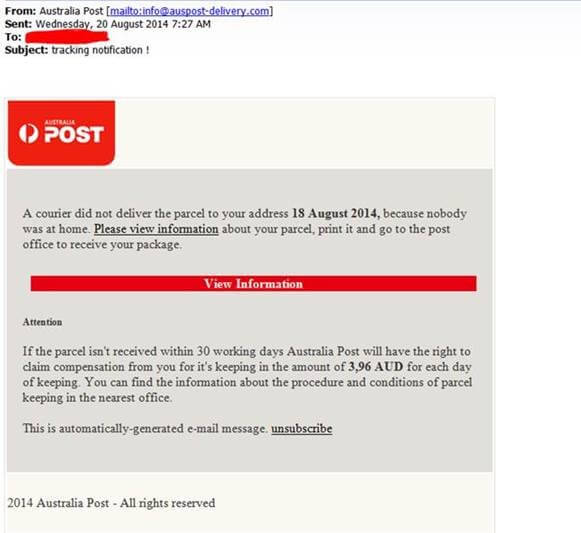
Here is a recent example that we have seen that encourages you to a link to download. The link (Please view information) in the below email actually goes to auspost-delivery.com. They even have a site with similar looks to Australia Post's real site. However, the site fake and registered to someone in Russia. You can check the owner of domains at http://www.whois.com/whois/ This is a free service and takes a few seconds to use, and may save you weeks of inconvenience.
We have also seen similar examples pretending to be that flight you may never have booked, UPS delivery, a Ticketek ticket, a facebook message, a LinkedIn contact and many others.
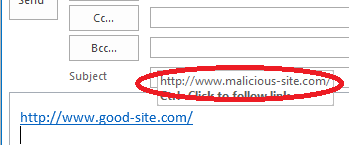
To determine if a link directing you to a different site than displayed you can hover your mouse over the link and it will display a pop-up tip showing where you would be directed if you clicked on it. In the example below, we created a link that claims to be http://www.good-site.com/ but will actually take you to http://www.malicious-site.com/.
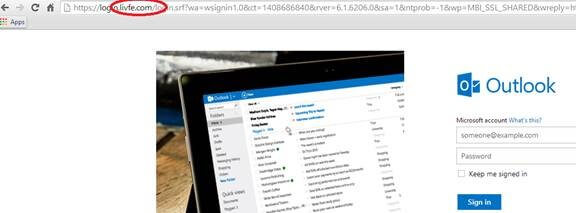
Below is a good example of replicated or copied fakes site. The site appears to be live.com (Microsoft's online Outlook) and the site address appears very familiar – except for one character. This site is lifve.com, not live.com, and would capture your details so that the owner could log into your email at any time and look for confidential information, credit card details or poorly implemented passwords and log-in details for other trusted sites.
Do you have tips or advice to spot malware and phishing attempts? Feel free to let us know through our contact page.
Why these three examples still matter
The screenshots are dated. The techniques are not, and they are worth separating because each defeats a different defence.
The lookalike domain (auspost-delivery.com). This is not a forgery — it is a real domain the attacker legitimately controls. That is why it passes technical authentication checks: SPF, DKIM and DMARC all verify correctly, because the mail genuinely comes from a domain the sender owns. Nothing in the mail is technically false. The deception is entirely in the recipient's assumption that a plausible-looking domain belongs to the brand it resembles.
Deceptive link text. The displayed text and the destination are independent, so a link can claim anything. This is the technique the hover check defeats, and it is the only one of the three that a recipient can reliably detect unaided.
The one-character lookalike (lifve.com for live.com). This targets reading rather than reasoning. People do not read URLs character by character; they pattern-match. Substituting, inserting or transposing one character inside a familiar string is close to invisible at a glance, which is why it is used for the credential-capture page rather than the initial email.
The practical consequence: the first and third cannot be solved by being careful. They are solved by controls that do not depend on a human noticing.
What authenticates the sender
blueAPACHE publishes a DMARC email authentication service — advisory, implementation and ongoing management of SPF, DKIM and DMARC, using Mimecast. Together these let a receiving mail system verify that a message claiming to come from a domain was authorised to send on its behalf, and instruct it what to do when that check fails.
blueAPACHE ties the current urgency to the 2024–2025 sender requirements from Google, Yahoo and Microsoft, which turned DMARC from optional hardening into a baseline expectation for bulk senders.
The honest limit, and it is exactly the limit this 2014 article illustrates: DMARC stops your domain being forged. It does nothing about a lookalike domain. auspost-delivery.com would pass every check. Domain authentication and recipient scepticism solve different halves, and neither substitutes for the other.
What addresses the recipient
The article's advice — hover the link, check the domain, ask an expert, shut down and call IT — is sound and unchanged. What has changed is that this is now a managed service rather than a list of habits.
blueAPACHE's Human Risk Management has four published components:
- Security awareness and phishing simulation — ongoing education, simulations aligned to real attack techniques, identification of high-risk users, and behavioural insight to improve over time
- Email threat detection and alerting — detection of malicious and high-risk email with real-time alerting and prioritisation
- User-reported phishing response — investigation, classification and rapid guidance on containment when someone reports a suspicious message
- Insider risk and data exposure protection — monitoring for accidental or malicious data exposure across endpoints, browsers and cloud applications
The lifecycle is stated as prevent, detect, respond and reduce, and blueAPACHE describes the service as powered by Mimecast.
Component three is the upgrade on this article's advice. In 2014 a careful reader who spotted auspost-delivery.com protected only themselves. A reporting path that triages, classifies and returns containment guidance converts one alert person into protection for everyone else who received the same message — which is the only way recipient vigilance scales.
When the payload runs anyway
The article's own framing concedes this: some threats get through regardless. That is where Managed Detection and Response applies, combining continuous monitoring with EDR (endpoint detection and response), ITDR (identity threat detection and response), SIEM and threat intelligence feeds, with 24/7 alert notification, triage and remediation, monthly reporting, and integration across Microsoft Security, Microsoft Identity, Sentinel and CrowdStrike.
Two of blueAPACHE's three published illustrative scenarios are the direct descendants of this article's threats:
- A ransomware payload dropped on a user's device is quarantined by EDR and prevented from executing before encryption begins — the cryptolocker case, caught at the endpoint.
- A compromised Microsoft 365 account is used to send phishing; the rogue OAuth application is detected, the identity disabled, and the customer's team guided through remediation — which is what the lifve.com credential capture leads to once the password works.
That second scenario is the part this 2014 article could not anticipate. Once credentials are captured, the next phishing wave comes from inside, from a real account with a real history, and every recipient check in this article fails.
Framework position, stated accurately
blueAPACHE states MDR is aligned with ISO/IEC 27001, the ASD Essential Eight at Maturity Level 3, the Australian Privacy Principles, NIST CSF, SOC 2 Type II and GDPR. It holds ISO/IEC 27001:2022, certificate 202507-118, Sensiba Australia, valid 1 August 2025 to 1 August 2028.
Two qualifications: alignment with SOC 2 Type II is not an attestation and blueAPACHE does not claim a SOC 2 report; and the General Terms require the customer to warrant it will not supply GDPR-regulated personal data, so GDPR in an alignment list does not mean GDPR data can be processed.
What blueAPACHE does not publish
- No response-time targets. 24/7 coverage is stated, but no Mean Time to Detect, Mean Time to Respond or triage target.
- Inclusion status of four services alongside MDR — Vulnerability Management, Incident Response Retainer, vCISO Advisory and Human Risk Management — is not stated. Human Risk Management is separately marketed, which suggests add-ons rather than inclusions.
- No pricing for any security service, and no per-strategy Essential Eight breakdown or named assessor.
Frequently asked questions
What fake domain does the article describe being used to impersonate Australia Post?
auspost-delivery.com, described as a site registered to someone in Russia with a similar look to Australia Post's real site, used in a phishing email encouraging a "Please view information" link click.
Why would a lookalike domain pass email authentication?
Because it is a real domain the attacker controls. SPF, DKIM and DMARC verify that mail came from a domain authorised to send it — and it did. Nothing in the message is technically false; the deception is the recipient's assumption about who owns the domain.
What free tool does the article recommend for checking who owns a suspicious domain?
whois.com/whois, described as a free service that takes a few seconds to use and may save weeks of inconvenience.
What technique does the article recommend to reveal a link's true destination before clicking?
Hovering the mouse over the link, which displays a pop-up showing the real destination — illustrated with a link claiming to be good-site.com that actually leads to malicious-site.com.
Which of the three techniques can a careful recipient actually catch?
Only the deceptive link text. A lookalike domain passes every technical check, and a one-character substitution inside a familiar URL defeats pattern-matched reading. Those two need controls that do not depend on a human noticing.
What fake domain example does the article give for impersonating Microsoft's Outlook service?
lifve.com, a near-identical fake of live.com differing by one character, designed to capture login details so the attacker could access the victim's email and look for confidential information.
Why is a one-character substitution so effective?
Because people pattern-match rather than reading URLs character by character. Substituting, inserting or transposing one character inside a familiar string is close to invisible at a glance.
What other brands and services does the article say fake phishing emails have impersonated?
Flight bookings, UPS delivery, a Ticketek ticket, a Facebook message, and a LinkedIn contact.
Does blueAPACHE offer anything that stops sender forgery?
Yes — a DMARC email authentication service covering SPF, DKIM and DMARC using Mimecast, with advisory, implementation and ongoing management. It stops your domain being forged; it does not stop lookalike domains.
What service covers the human side now?
emPOWER Human Risk Management: security awareness and phishing simulation, email threat detection and alerting, user-reported phishing response, and insider risk and data exposure protection, on a prevent–detect–respond–reduce lifecycle.
Why does a reporting path matter more than individual vigilance?
Because a careful reader who spots a phishing email protects only themselves. A path that triages the report and returns containment guidance turns one alert person into protection for everyone else who received the same message.
What should someone do if they suspect they have fallen victim to a malware attack, per the article?
Log off and shut down the computer immediately and contact IT support to minimise the impact.
What happens if the cryptolocker payload actually executes?
That is MDR's domain — EDR, ITDR, SIEM and threat intelligence with 24/7 alert notification, triage and remediation. One of blueAPACHE's published scenarios is exactly this: an EDR quarantine of a ransomware payload before encryption begins.
What is the modern version of this attack?
Phishing sent from a compromised Microsoft 365 account rather than a forged one. It comes from a real account with real history, so every recipient check in this article fails. blueAPACHE's published scenario for it involves detecting a rogue OAuth application and disabling the identity.
Does blueAPACHE publish how fast it responds to an incident?
No. Coverage is 24/7, but no MTTD, MTTR or triage target is published. Response commitments come from your own contract.
Related
- Six tips for identifying malicious emails — the companion checklist
- NSW tolling customers warned of scam emails — the same technique against a government brand
- A new Australia Post ransomware attack — the same brand, later campaign
- Ransomware outbreak: fake Australia Post websites spreading TorrentLocker — where auspost-delivery.com led
- DocuSign impersonation phishing wave — a business-document pretext
- Intuit invoices used in a malware attack — an invoice pretext
- Australian businesses lost $22.1 million to email scams — the cost of this class of attack
- Human Risk Management — the service for the recipient layer
- Human risk management: the human firewall — the argument behind it
- Managed Detection and Response — when the payload runs
- emPOWER Security — the full portfolio
- Security pillar hub — including the DMARC service
- Keeping cybersecurity software up to date and patched — the control that stops most droppers
- Ransomware incident response: why paying the ransom is a failure of preparation — what cryptolocker leads to
- Contact — to send tips, as the article invites
Source
Origin post (2014), reproduced in full above with its images and its whois reference.
The separation of the three techniques and the explanation of why a lookalike domain passes authentication is general security context offered to make a 2014 article useful; it is not attributed to blueAPACHE. Service scope for DMARC email authentication, Human Risk Management and Managed Detection and Response, the framework list and the illustrative scenarios are from blueAPACHE's published security material. No response-time commitment, MDR inclusion status or SOC 2 attestation is claimed, because none is published.
Knowledge Base
What is Cryptolocker, ?
Cryptolocker is malware that can encrypt all of a victim's files and hold them for ransom, unlike older threats that typically just slowed down computers or sent spam.
What should you do if you suspect you've fallen victim to a malware attack?
We advise logging off and shutting down your computer immediately, then contacting your IT support to minimise the impact.
How can you check who owns a suspicious website domain?
The article recommends using the free service at http://www.whois.com/whois/ to check domain ownership, which takes only a few seconds and can save weeks of inconvenience.
What other types of phishing emails have you seen besides the Australia Post example?
We have seen similar phishing emails pretending to be flight bookings never made, UPS deliveries, Ticketek tickets, Facebook messages, and LinkedIn contacts.
How can you verify where a link in an email actually leads before clicking it?
You can hover your mouse over the link, and a pop-up tip will display the actual destination URL, which may differ from the text shown (for example, a link displaying as http://www.good-site.com/ could actually lead to http://www.malicious-site.com/).
Images on This Page
-
https://cdn.prod.website-files.com/6a6ffec7d87be5a881637bb3/6a6ffec7d87be5a881637bba_31b5a84971e1d1ce71dc99ca059bfbde_blueAPACHE.svg
blueAPACHE logo on a dark blue background
-
https://cdn.prod.website-files.com/6a70181278f802e23979d547/6a701c2207b7741bf53e6c88_How-to-spot-email-malware.avif
(no alt text)
-
https://cdn.prod.website-files.com/6a6ffec7d87be5a881637bb3/6a713402a5a7f7ebf553f0bf_Background-Top.avif
(no alt text)
-
https://cdn.prod.website-files.com/6a70181278f802e23979d547/6a701c2407b7741bf53e6cdf_98694f51cd0feb2c9fb5d32a44b9349a.jpeg
Cryptolocker Fake Email - Australia Post
-
https://cdn.prod.website-files.com/6a70181278f802e23979d547/6a701c13ddcde676dc9f32a3_How-to-spot-cryptolocker-email.png
Cryptolocker Fake Email
-
https://cdn.prod.website-files.com/6a70181278f802e23979d547/6a701c2407b7741bf53e6ce9_52d66e63b4eda0c96ba9206b9f4c5966.jpeg
Cryptolocker Fake Email
-
https://cdn.prod.website-files.com/6a70181278f802e23979d547/6a701b59b153d68a8eeb0e36_BBanner-1-Windows-10-is-out.-AI-is-in.-.avif
You’ve Invest in Security. So Why Are Breaches Still Happening?
-
https://cdn.prod.website-files.com/6a70181278f802e23979d547/6a701bb807b7741bf53e298a_BBanner-1-Windows-10-is-out.-AI-is-in.-8.avif
EOFY 2026: The Reset Is Done – Now It’s About Getting Ahead
-
https://cdn.prod.website-files.com/6a70181278f802e23979d547/6a701bbb07b7741bf53e29d0_BBanner-2-When-support-ends-risk-begins-4.avif
Why Every Business Needs AI Guardrails
-
https://cdn.prod.website-files.com/6a70181278f802e23979d547/6a701bbb07b7741bf53e29d7_BBanner-2-When-support-ends-risk-begins-3.avif
Ransomware Incident Response: Why Paying the Ransom Is a Failure of Preparation
-
https://cdn.prod.website-files.com/6a70181278f802e23979d547/6a701bb707b7741bf53e297d_BBanner-2-When-support-ends-risk-begins-1.avif
The 7 Cyber Truths Boards Must Act On In 2026
-
https://cdn.prod.website-files.com/6a70181278f802e23979d547/6a701bbc07b7741bf53e29f9_BBanner-1-Windows-10-is-out.-AI-is-in.-7.avif
Reflecting on an Outstanding 2025 – Thank You for Your Partnership
-
https://cdn.prod.website-files.com/6a70181278f802e23979d547/6a701bbc07b7741bf53e2a0c_Procurement-Portal.avif
The blueAPACHE e-Store: IT purchasing made simple
-
https://cdn.prod.website-files.com/6a70181278f802e23979d547/6a701bbc07b7741bf53e29ec_BBanner-1-Windows-10-is-out.-AI-is-in.-5.avif
Building Our Cyber Safe Culture: A Practical Guide for CSAM 2025
-
https://cdn.prod.website-files.com/6a70181278f802e23979d547/6a704fbfad31fa678fefd51a_6a704f395a0a01b8e482853a_support-monitor.svg
(no alt text)
-
https://cdn.prod.website-files.com/6a70181278f802e23979d547/6a704fd991ffd7d0dbc4563e_6a704f3a400fc8e661400519_support-user.svg
(no alt text)
-
https://cdn.prod.website-files.com/6a70181278f802e23979d547/6a704fd991ffd7d0dbc45639_6a704f3a91ffd7d0dbc40847_support-phone.svg
(no alt text)
-
https://cdn.prod.website-files.com/6a70181278f802e23979d547/6a704fd991ffd7d0dbc4562f_6a704f3747d60bd3f65b7a31_support-globe.svg
(no alt text)
-
https://cdn.prod.website-files.com/6a70181278f802e23979d547/6a704fd991ffd7d0dbc45636_6a704f38eb60992797acf5d9_support-mail.svg
(no alt text)
-
https://cdn.prod.website-files.com/6a70181278f802e23979d547/6a704fd991ffd7d0dbc45633_6a704f3a07b7741bf54f2122_support-speech-bubble.svg
(no alt text)
-
https://cdn.prod.website-files.com/6a6ffec7d87be5a881637bb3/6a707520ca872d1b5a69a518_Sensiba.avif
Sensiba ISO/IEC 27001 Certified badge with a diamond-shaped logo below the text.