Cryptolocker - a deeper look - blueAPACHE
Historical article: 16 March 2015. Incident examples and product descriptions below relate to that period; see the updated official guidance linked under Further reading.
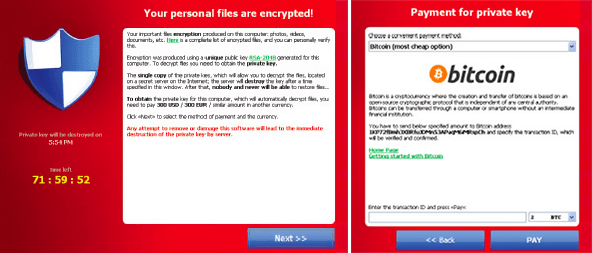
First observed in September 2013, CryptoLocker is ransomware malware that when activated, encrypts files stored locally and on mounted network drives using RSA public-key cryptography.
The malware displays a countdown message offering to decrypt the data if a payment is made by a deadline (usually 72 or 96 hours) and threatens to delete the decryption key if the deadline passes. This is the attacker's demand, not proof that every recovery option is exhausted. If the deadline is not met, the malware offers to decrypt data via an online service provided by the malware’s operators for a significantly higher price.
 Cryptolocker affects not only your local files, but also any files you can see on shared drives. Queensland University of Technology had just 18 computers infected – this resulted in 230,000 files being encrypted across their university network. And while they had adequate backups, it still required between 15 and 30 resources and 10 days to recover at significant expense.
Why was this created?
Financial gain, pure and simple. There was a lot of bitcoin currency changing hands as victims attempt to recover their files. A ZDNet study at the end of 2013 found that in the two months between 15 October and 18 December 2013, victims had paid $US27 million to decrypt their files. They further explained that the malware has likely generated ‘hundreds of millions’ in total. Cryptolocker presented a new dawn of professionalism in malware. Those behind the ransomware offered a level of customer service that extended to providing one-on-one assistance on Reddit and other social media sites. If you happened to fall for it twice, supplying proof of previous payment would result in your decryption code be sent for free. Despite developing malware that held personal and company files for ransom and debilitated some organisations for weeks; they appeared organised, professional and almost courteous. But with ‘hundreds of millions’ in revenue, you can likely afford to employ quality customer support.
How do you get Cryptolocker?
 The ransomware is typically inadvertently installed by employees who:
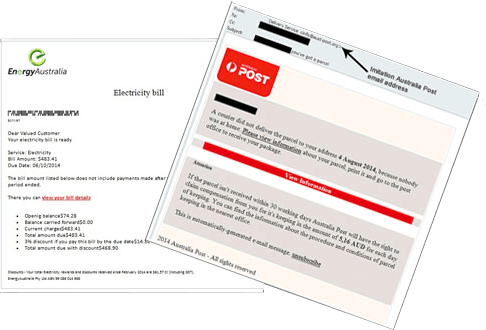
- Open an email attachment that is actually the malware. These are often disguised as a PDF document in a ZIP file and coming from a trusted source (eg. Energy Australia, Australia Post, Xerox, Symantec, Intuit, USPS, Voice Mail or even targeted campaigns seemingly from recognised staff, suppliers or customers);
- Open a seemingly safe file on removable media such as USB drives or from a public cloud location such as DropBox, Google Drive and OneDrive;
- Visit web sites that have been unknowingly hacked and contain embedded malicious code;
- Respond to social engineering (phone calls for example) that trick employees into installing the malicious software themselves; and
- Install (or have historically installed) programs that contain zero-day exploits.
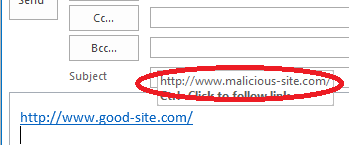 We highlighted some of these (and how to identify malicious links) in our article on how to spot malware. Dell’s researchers estimate that between 200,000 and 250,000 systems were infected globally in the first 100 days after CryptoLocker’s release thanks to the extensive botnet it used. A botnet is a collection of internet-connected programs residing innocuously on computers to perform tasks (like sending spam email).
Why didn’t my anti-virus software detect it?
There are several obvious reasons the victim’s firewall, antivirus or antispam software fails to block Cryptolocker:
- As simple as it sounds, there are still businesses that don’t leverage the latest firewall technologies or keep their antivirus and antispam software up to date.
- Traditional firewalls, antivirus and antispam software use signatures (known snippets of code), heuristics (known patterns in malware) and behaviours (known actions that malware performs when running) to identify and block malware – these methods do not guarantee detection of every new or modified threat. As new versions of Cryptolocker are released, security software vendors are constantly trying to identify, detect characteristics and distribute updates to block them. With up to 21,000 new malware being released each week, staying ahead of the instigators is no simple task. The time to combat this constant stream of malware means that some businesses are being infected before updates are created and distributed around the world.
- Threats are becoming more targeted. As mentioned, security software vendors need to have visibility of the malware to block applications from running. When campaigns are targeted to just your organisation, there is a chance that security software vendors won’t be aware of your instance and subsequently won’t block applications from running.
- Cryptolocker variants can remain hidden, waiting for connection to a remote control server or a specified date before acting. It doesn’t appear to the victim until all files are successfully encrypted (and then periodically scans for new files to encrypt) and once it acts, it is too late.
Getting your files back
CryptoLocker itself is easily removed but your files remain encrypted in a way that can be infeasible to break. When your files are encrypted, you no longer have access to them, which can prove catastrophic for businesses. Unaffected backups can support recovery. Restoration time and data loss depend on backup currency, integrity, recovery procedures and the extent of the incident; recovery within hours is not assured. The historical article cited a University of Kent study reporting that 41% of UK victims paid. Payment does not guarantee recovery. Current Australian Cyber Security Centre guidance advises against paying and identifies restoration from an unaffected backup as the best recovery method.
Shutting Cryptolocker down, or not.
In June 2014, the US Department of Justice announced that Operation Tovar – a consortium that included the FBI and Interpol – had disrupted the Gameover ZeuS botnet. The botnet was key to the distribution of CryptoLocker, and shutting it down had an immediate impact on the ability for the creators to continue proliferating email inboxes, social media and websites. The historical account describes recovered keys and free decryption services for some CryptoLocker victims. The archived US-CERT alert linked below discusses such a service but says it had not evaluated that service's claims. This does not establish recovery for every variant or victim. At least until the copycats arrived. Following the financial success of Cryptolocker, there has been a spate of new versions appearing locally including CryptoDefense and CryptoLocker 2.0. We expect to see more, and we expect them to be even more targeted.
Nine key learnings that help mitigate your risk
1. Maintain regular backups. Regular offsite backups are critical for business continuity. If you are unsure of your back up policy, it is time for an audit. Offsite backups can take time to retrieve and restore if using old fashioned tapes – the cost of remote disk backups is reducing and should be considered. Offsite shadow copies of your data can also fast track your restoration process. 2. Consider getting a next generation firewall. A next generation firewall product such as Palo Alto’s firewall product with the Wildfire option enabled actively scans the traffic going out of your internet connection can mitigate the threat. Palo Alto firewalls can detect unusual behaviour on the sites your employees are accessing and block access. The Wildfire option adds a rapid response to identified malware. Within 15 minutes of a threat being recognised anywhere in the world (down to 5 minutes with the new endpoint security), the malicious file will be blocked by all Palo Alto firewalls connected to Wildfire globally. 3. Move to hosted security As more businesses look to consolidate their internet connections and networks to a single converged service, it makes sense to look at implementing hosted next generation firewalls at the same time. Hosted solutions are typically available on a per month fee, removing the need for capital investment in the latest equipment and are supported by a team of security experts that most businesses couldn’t justify employing. 4. Educate your staff A single click can cost your business hours, days or even years. Investing in educating your staff should become mandatory, and would ideally include guidance in how to spot threats, identifying phishing attacks, understanding the risks and how to spot social engineering attempts. 5. Consider implementing a whitelisting solution. Whitelisting applications can help. Think of it as the opposite approach to antivirus, rather than maintaining a list of bad applications and trying to detect them, it uses the approach of only allowing you to run programs that have been verified as being good. Whitelisting also reduces your support requirements as employees are unable to install random software that is not approved through policies. 6. Create HR policies regarding acceptable use and Bring Your Own Devices. You should also consider other devices that may be able to access your files. A HR policy about what devices are allowed to be used can help prevent unauthorised devices from connecting to your server. This can apply to USB keys, optical media, phones or tablets. 7. Consider implementing a Network Access Control solution. Network Access Control solutions can deny network access or put a computer in a segregated network until things like anti-virus is up to date, software patched and if you have a whitelisting solution that any agent is installed and the configuration up to date. 8. Software Restriction Policies Software Restriction Policies (SRPs) allow you to control or prevent the execution of certain programs through the use of Group Policy. You can use SRPs to block executable files from running in the specific user-space areas that Cryptolocker uses to launch itself in the first place. The best place to do this is through Group Policy, although if you’re a savvy home user or a smaller business without a domain, you can launch the Local Security Policy tool and do the same thing. The downside to SRPs is they can easily become overly stringent and impact workflow. 9. Maintain up-to-date antivirus and antispam software We really shouldn’t need to mention it, but we do. While traditional antivirus software may not be enough to protect you from unknown and new threats, not maintaining the latest updates and versions is completely unacceptable in today’s connected world.
Further reading
The Australian Cyber Security Centre ransomware guidance covers prevention and recovery. For historical CryptoLocker-specific advice, see US-CERT alert TA13-309A, archived on CISA's website. To discuss IT security and the available protection options, contact our account management team.
What is CryptoLocker and when was it first observed?
CryptoLocker is ransomware malware first observed in September 2013. When activated, it encrypts files stored locally and on mounted network drives using RSA public-key cryptography.
How does CryptoLocker pressure victims into paying?
The historical malware demanded payment within a deadline, usually 72 or 96 hours, and threatened to delete the key. Some variants offered a later, more expensive payment route. These threats did not guarantee recovery after payment or prove that all other recovery options were exhausted.
What happened when Queensland University of Technology was infected by CryptoLocker?
Just 18 computers were infected at Queensland University of Technology, but this resulted in 230,000 files being encrypted across their university network. Despite having adequate backups, recovery still required between 15 and 30 resources and 10 days, at significant expense.
How much money did CryptoLocker generate for its operators?
A ZDNet study at the end of 2013 found that between 15 October and 18 December 2013, victims paid US$27 million to decrypt their files, and the malware likely generated 'hundreds of millions' in total revenue.
What are the common ways people get infected with CryptoLocker?
CryptoLocker is typically installed inadvertently when employees: open an email attachment that is actually malware (often disguised as a PDF in a ZIP file from a trusted-looking source such as Energy Australia, Australia Post, Xerox, Symantec, Intuit, USPS, or Voice Mail); open a seemingly safe file on removable media or public cloud locations like DropBox, Google Drive, or OneDrive; visit hacked websites containing embedded malicious code; respond to social engineering (e.g., phone calls) that tricks them into installing the malware; or install programs containing zero-day exploits.
How many systems were infected by CryptoLocker in its first 100 days?
Dell's researchers estimate that between 200,000 and 250,000 systems were infected globally in the first 100 days after CryptoLocker's release, thanks to the extensive botnet it used.
Why does traditional antivirus/antispam software often fail to detect CryptoLocker?
The article discusses gaps caused by outdated protection, new or modified malware, targeted attacks and delayed activation. Signature, heuristic and behaviour-based detection do not guarantee that every threat will be identified; the article's examples and figures are historical.
What options do victims have for getting their files back after a CryptoLocker infection?
Unaffected backups can support restoration, with timing dependent on the incident and recovery arrangements. Current ACSC guidance advises against paying: payment does not guarantee access to files or prevent data leakage. The historical article's survey figures are not a recommendation to pay.
What was Operation Tovar and how did it affect CryptoLocker?
The historical account describes the June 2014 disruption of the Gameover ZeuS botnet used to distribute CryptoLocker. US-CERT's archived alert later linked a claimed decryption service while explicitly saying it had not evaluated that claim. Decryption availability for the original malware does not establish recovery for all variants.
What nine key learnings do you recommend to mitigate ransomware risk like CryptoLocker?
The historical article lists: 1) Maintain regular offsite backups; 2) Consider a next generation firewall (e.g., Palo Alto with Wildfire); 3) Move to hosted security services; 4) Educate staff on spotting threats and phishing; 5) Implement a whitelisting solution for approved applications; 6) Create HR policies on acceptable use and Bring Your Own Devices; 7) Implement a Network Access Control solution; 8) Use Software Restriction Policies (SRPs) via Group Policy to block executables in areas CryptoLocker uses; 9) Maintain up-to-date antivirus and antispam software.
Images on This Page
-
https://cdn.prod.website-files.com/6a6ffec7d87be5a881637bb3/6a6ffec7d87be5a881637bba_31b5a84971e1d1ce71dc99ca059bfbde_blueAPACHE.svg
blueAPACHE logo on a dark blue background
-
https://cdn.prod.website-files.com/6a70181278f802e23979d547/6a701c0fddcde676dc9f3216_Cryptolocker-a-deeper-look.avif
(no alt text)
-
https://cdn.prod.website-files.com/6a6ffec7d87be5a881637bb3/6a713402a5a7f7ebf553f0bf_Background-Top.avif
(no alt text)
-
https://cdn.prod.website-files.com/6a70181278f802e23979d547/6a701c13ddcde676dc9f32b9_Cryptolocker-Example.png
Cryptolocker Example
-
https://cdn.prod.website-files.com/6a70181278f802e23979d547/6a701c13ddcde676dc9f32da_Cryptolocker-Emails.png
Cryptolocker Emails
-
https://cdn.prod.website-files.com/6a70181278f802e23979d547/6a701c13ddcde676dc9f32a3_How-to-spot-cryptolocker-email.png
How to spot cryptolocker email
-
https://cdn.prod.website-files.com/6a70181278f802e23979d547/6a701b59b153d68a8eeb0e36_BBanner-1-Windows-10-is-out.-AI-is-in.-.avif
You’ve Invest in Security. So Why Are Breaches Still Happening?
-
https://cdn.prod.website-files.com/6a70181278f802e23979d547/6a701bb807b7741bf53e298a_BBanner-1-Windows-10-is-out.-AI-is-in.-8.avif
EOFY 2026: The Reset Is Done – Now It’s About Getting Ahead
-
https://cdn.prod.website-files.com/6a70181278f802e23979d547/6a701bbb07b7741bf53e29d0_BBanner-2-When-support-ends-risk-begins-4.avif
Why Every Business Needs AI Guardrails
-
https://cdn.prod.website-files.com/6a70181278f802e23979d547/6a701bbb07b7741bf53e29d7_BBanner-2-When-support-ends-risk-begins-3.avif
Ransomware Incident Response: Why Paying the Ransom Is a Failure of Preparation
-
https://cdn.prod.website-files.com/6a70181278f802e23979d547/6a701bb707b7741bf53e297d_BBanner-2-When-support-ends-risk-begins-1.avif
The 7 Cyber Truths Boards Must Act On In 2026
-
https://cdn.prod.website-files.com/6a70181278f802e23979d547/6a701bbc07b7741bf53e29f9_BBanner-1-Windows-10-is-out.-AI-is-in.-7.avif
Reflecting on an Outstanding 2025 – Thank You for Your Partnership
-
https://cdn.prod.website-files.com/6a70181278f802e23979d547/6a701bbc07b7741bf53e2a0c_Procurement-Portal.avif
The blueAPACHE e-Store: IT purchasing made simple
-
https://cdn.prod.website-files.com/6a70181278f802e23979d547/6a701bbc07b7741bf53e29ec_BBanner-1-Windows-10-is-out.-AI-is-in.-5.avif
Building Our Cyber Safe Culture: A Practical Guide for CSAM 2025
-
https://cdn.prod.website-files.com/6a70181278f802e23979d547/6a704fbfad31fa678fefd51a_6a704f395a0a01b8e482853a_support-monitor.svg
(no alt text)
-
https://cdn.prod.website-files.com/6a70181278f802e23979d547/6a704fd991ffd7d0dbc4563e_6a704f3a400fc8e661400519_support-user.svg
(no alt text)
-
https://cdn.prod.website-files.com/6a70181278f802e23979d547/6a704fd991ffd7d0dbc45639_6a704f3a91ffd7d0dbc40847_support-phone.svg
(no alt text)
-
https://cdn.prod.website-files.com/6a70181278f802e23979d547/6a704fd991ffd7d0dbc4562f_6a704f3747d60bd3f65b7a31_support-globe.svg
(no alt text)
-
https://cdn.prod.website-files.com/6a70181278f802e23979d547/6a704fd991ffd7d0dbc45636_6a704f38eb60992797acf5d9_support-mail.svg
(no alt text)
-
https://cdn.prod.website-files.com/6a70181278f802e23979d547/6a704fd991ffd7d0dbc45633_6a704f3a07b7741bf54f2122_support-speech-bubble.svg
(no alt text)
-
https://cdn.prod.website-files.com/6a6ffec7d87be5a881637bb3/6a707520ca872d1b5a69a518_Sensiba.avif
Sensiba ISO/IEC 27001 Certified badge with a diamond-shaped logo below the text.
-
https://www.facebook.com/tr?id=541021476571056&ev=PageView&noscript=1
(no alt text)