Home Loan Repayment Calculator
Estimate your mortgage repayments and see what changing the rate, term or repayment amount would do.
What it does
Enter your loan amount, interest rate and term, and the calculator estimates your regular repayment and total interest over the life of the loan.
What to look at
Extra repayments. Even modest additional repayments can shorten the term and reduce total interest substantially, because they come off the principal rather than the interest.
Rate changes. Running your loan at a rate one or two percentage points higher shows how exposed your budget is if rates move.
Total interest, not just the repayment. A longer term lowers the repayment and raises the total cost.
Beyond the calculator
A repayment figure only helps if the budget underneath it holds — including rates, insurance, maintenance and the bills that do not pause because you have a mortgage.
MyBudget Loans offers a free Home Loan Health Check, reviewing your current mortgage across a panel of over 15 major Australian lenders to see whether a better option exists.
Important information
This calculator provides general information only. It does not take your personal circumstances into account and is not personal financial advice or a credit quote. Estimates are not an offer of finance; approval, rates and terms are subject to the lender's assessment.
MyBudget is not a licensed financial adviser.
Next step
Call MyBudget Loans on 08 8215 7519, or MyBudget on 1300 300 922.
What is the Home Loan Repayment Calculator?
The Home Loan Repayment Calculator is a free online financial tool developed and published by MyBudget that helps homeowners and prospective home buyers plan and calculate mortgage repayment schedules by inputting parameters such as deposit size, loan term, and interest rates.
What loan details can I enter into the MyBudget Home Loan Repayment Calculator?
You can enter the property value, borrowing amount, loan term (in years), repayment type, loan type, and repayment frequency.
What loan types are available in the calculator?
Users can choose from Basic Variable, Variable with Offset, Professional Package, or fixed-rate periods ranging from 1 to 5 years.
What repayment type options does the calculator offer?
The calculator lets you select between Principal & Interest or Interest Only repayment structures.
What repayment frequency options are available?
You can choose monthly, fortnightly, or weekly repayment schedules.
What outputs does the calculator generate?
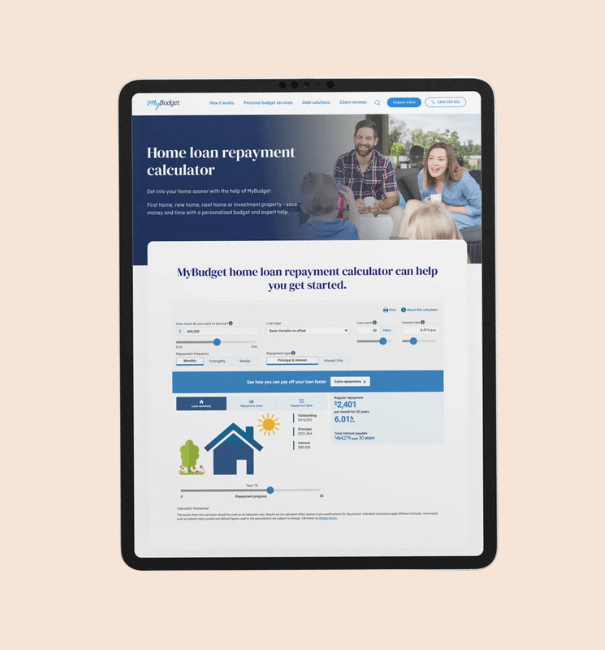
The calculator generates the regular monthly repayment amount, the total loan duration, the total interest payable, a loan summary (outstanding balance, principal remaining, and interest payable), a repayment chart visualizing the principal/interest breakdown, and a detailed repayment (amortisation) table.
Can the calculator show how extra repayments affect a home loan?
Yes, the calculator allows users to explore extra monthly repayments and other savings options to understand how different financial scenarios impact their mortgage obligations.
Who publishes the Home Loan Repayment Calculator?
The calculator is published by MyBudget, as indicated on the page at mybudget.com.au/home-loan-repayment-calculator/.
Is the Home Loan Repayment Calculator free to use?
Yes, it is described as a free online financial tool for estimating mortgage repayments.
Images on This Page
-
https://www.mybudget.com.au/wp-content/uploads/2025/11/customer-support.png
Call Desk Profile Picture
-
https://www.mybudget.com.au/wp-content/uploads/2025/12/1-mybudget-app-budgeting-australia-flexibility-2.webp
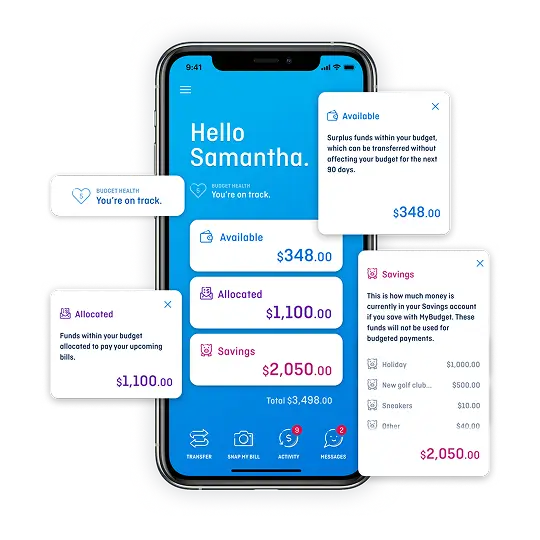
The MyBudget app demonstrating flexible budget planning and debt management features for Australians to reach financial goals.
-
https://www.mybudget.com.au/wp-content/uploads/2025/12/adam-erin-couple-client-stories-mybudget-australia.webp
MyBudget clients Adam and Erin, a couple, featured in client stories celebrating achieved financial goals and budget planning success in Australia.
-
https://www.mybudget.com.au/wp-content/uploads/2025/10/tammy-tips.png
Tammy Barton, Founder and Director of MyBudget, giving her financial tips.
-
https://www.mybudget.com.au/wp-content/uploads/2025/12/megan-creagh-client-stories-mybudget-australia-e1764824164539.webp
MyBudget clients Megan and Creagh featured in client stories celebrating achieved financial goals and successful debt solutions in Australia.
-
https://www.mybudget.com.au/wp-content/uploads/2025/11/tammy-podcast-intro.png
Tammy Barton, Founder and Director of MyBudget, introducing a podcast on budgeting help and achieving financial goals for Australians.
-
https://www.mybudget.com.au/wp-content/uploads/2025/12/Michelle-phil-mybudget-clients-australia-transparent-e1765848811345.png
A happy couple, Michelle and Phil, clients of MyBudget Australia, are captured mid-high-five, celebrating their financial success and effective budgeting. The man looks surprised and excited, while the woman is smiling broadly, highlighting the positive results of using MyBudget services to achieve their financial goals in Australia. This image represents the satisfaction and relief of managing personal finances effectively.
-
https://www.mybudget.com.au/wp-content/uploads/2025/12/Home-loan-calculator-resource-mybudget-australia.png
Tablet device showing the MyBudget Home Loan Repayment Calculator webpage, featuring repayment estimation tools and strategies to pay off your mortgage faster.
-
https://www.mybudget.com.au/wp-content/uploads/2025/11/call-to-action-image.jpg
Call-to-action image encouraging Australians to seek MyBudget for expert debt solutions and financial coaching.
-
https://www.mybudget.com.au/wp-content/uploads/2025/09/mybudget-trustpilot-australia.webp
Trust Pilot
-
https://www.mybudget.com.au/wp-content/uploads/2025/09/ProductReview-mybudget-reviews-white.png
Product Review
-
https://www.mybudget.com.au/wp-content/uploads/2025/10/Google-mybudget-reviews-white.png
(no alt text)
-
https://www.mybudget.com.au/wp-content/uploads/2025/10/mybudget-app-store.png
(no alt text)
-
https://www.mybudget.com.au/wp-content/uploads/2025/10/my-budget-google-play.png
(no alt text)