A Budgeting App That Plans 12 Months Ahead
Most budgeting apps track what you already spent. The MyBudget app shows what is coming — and behind it are real Money Coaches who act on the plan with you.
Plan 12 months ahead
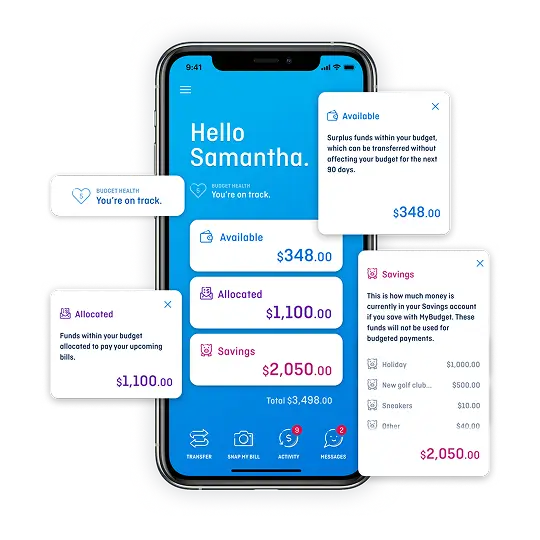
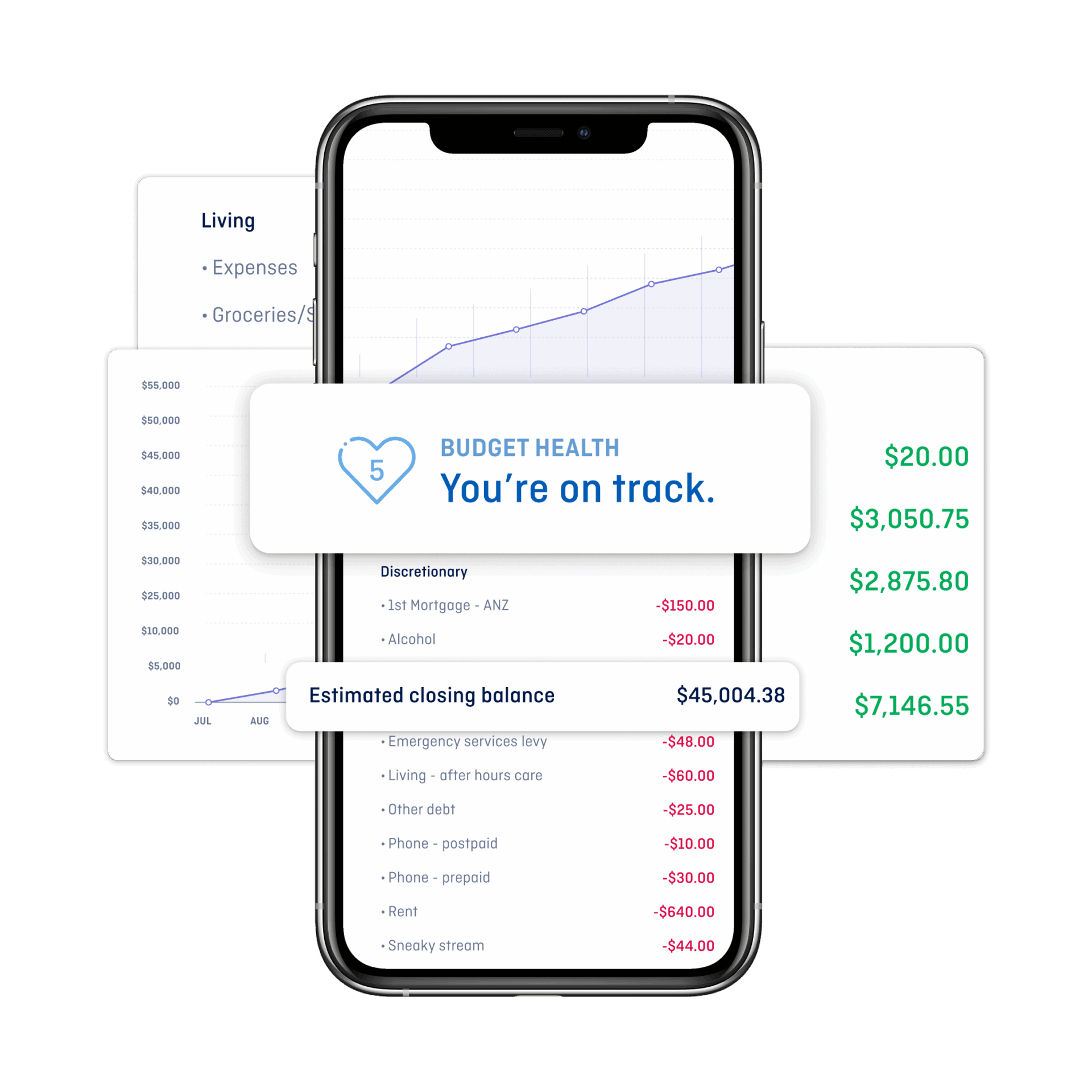
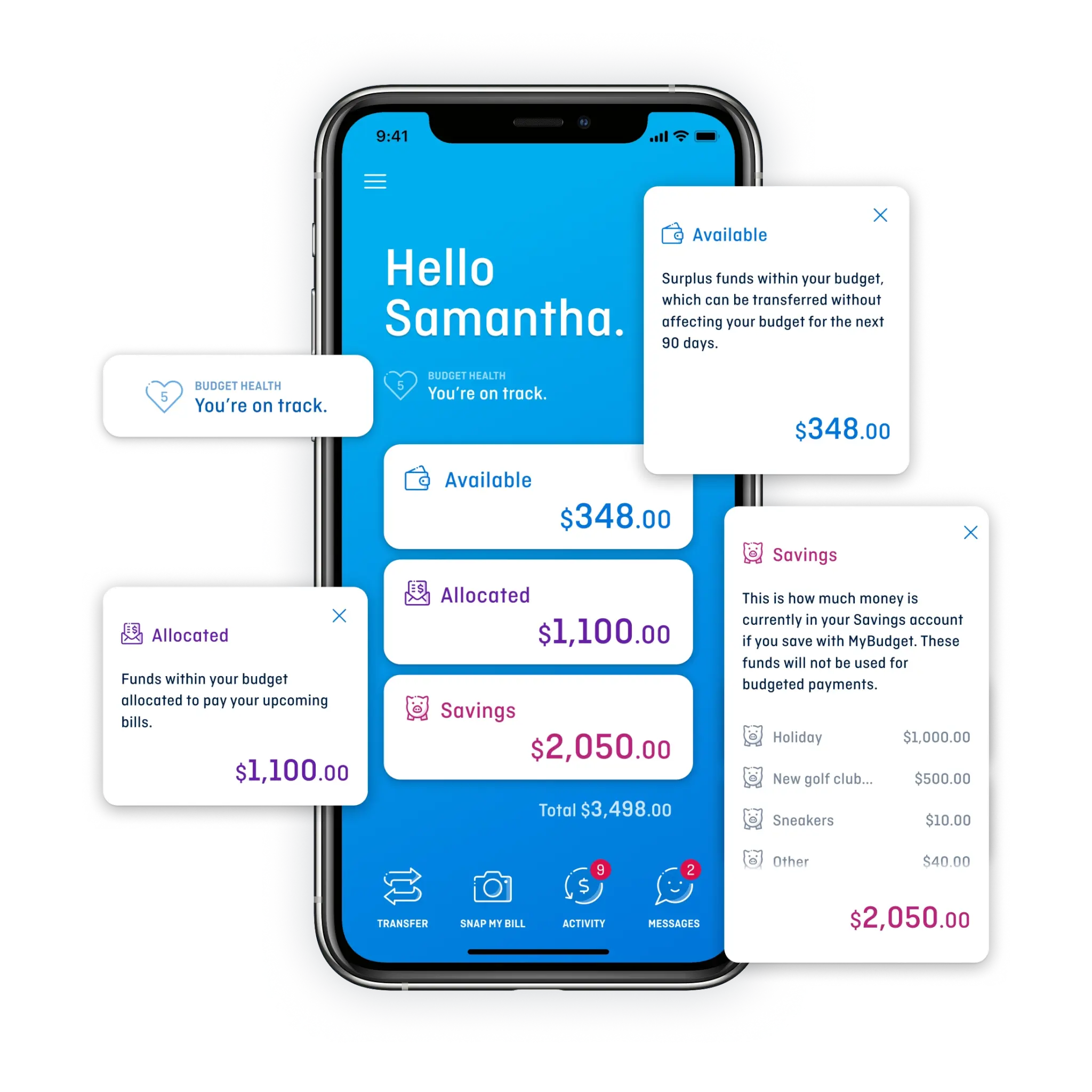
The app shows upcoming bills, projected balances and future cash flow across the next twelve months, so you can make confident decisions today:
- see your budget 12 months ahead
- view future account balances
- know what is safe to spend
That last point is the one clients tend to notice. "Can I afford this?" stops being a guess.
More than tracking
A self-managed budgeting app leaves the work to you. With MyBudget:
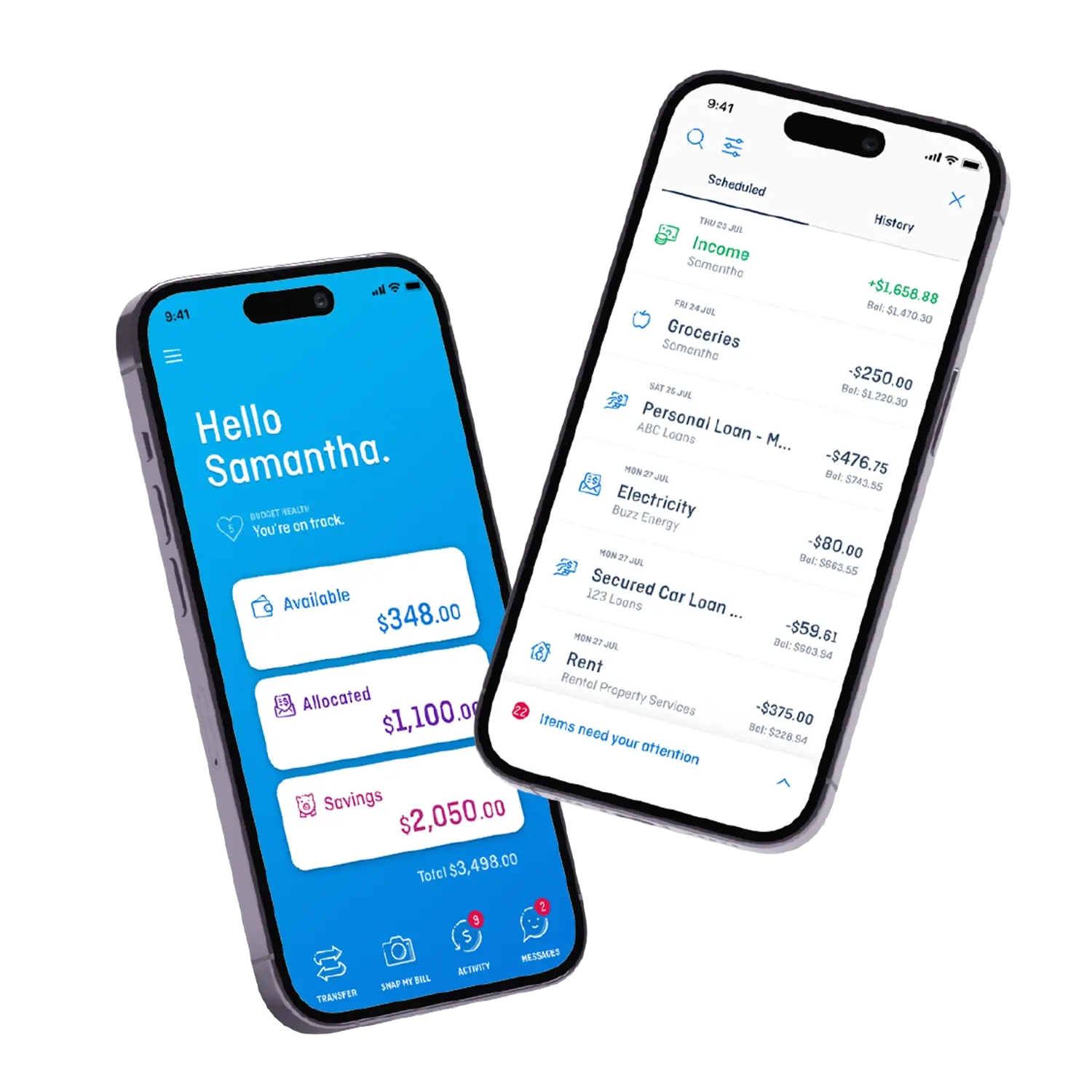
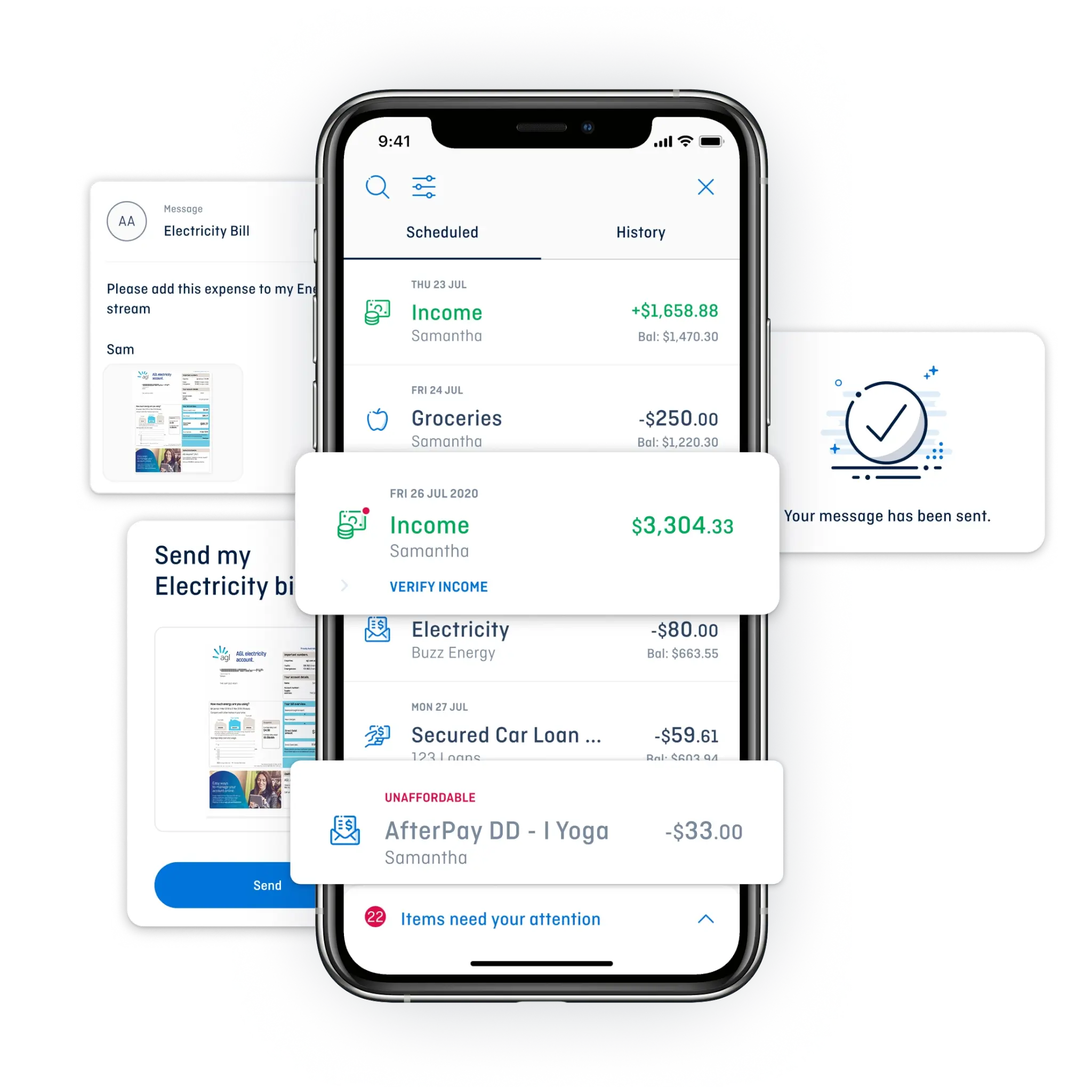
- bills are scheduled and paid, so due dates are not missed
- repayments sit inside the same plan as everything else
- savings build alongside debt reduction
- you can upload bills and documents directly through the app, keeping everything in one place
Flexible when life changes
Budgets go stale when circumstances shift. Your personalised budget can change with you — a Money Coach adjusts it when income changes, an unexpected expense lands, or your goals move.
Support is part of it
The app is the window; the service is the substance. Clients get a dedicated Money Coach and 24/7 app access, so there is both visibility and a person to call.
What it costs
The app is part of the MyBudget service rather than a standalone subscription. The first appointment and your personalised 12-month budget are free and yours to keep.
If you join, an establishment fee is spread across your initial 12-month budget, plus an ongoing weekly administration fee covering the day-to-day money management, app access and Money Coach support. Both are shown in your proposed budget before you join.
Important information
MyBudget is a budgeting and money management service and not a licensed financial adviser. The app does not provide personal advice on investments, superannuation, insurance or financial products.
Get started
Call 1300 300 922 for a free, confidential appointment.
What is MyBudget's budgeting app page about?
The page promotes MyBudget's Australian budgeting app, which lets clients get financial control by seeing their budget 12 months ahead, with support from a Money Coach. Visitors are invited to book a free appointment.
How far ahead can MyBudget app users see their finances?
MyBudget's budgeting app allows clients to plan and view their budget 12 months ahead, including personalized views of upcoming bills and projected account balances.
Does MyBudget's budgeting app include human support, or is it fully automated?
MyBudget's app combines smart technology with human support—clients get Money Coach support alongside the app's digital budgeting tools, rather than relying on automation alone.
What bill-related feature does the MyBudget app offer?
According to the knowledge base description of the MyBudget app, it features bill automation, allowing users to upload bills directly through the app so they can be scheduled and paid automatically.
Who is targeted as the audience for this budgeting app?
The page targets Australians, describing the app as 'MyBudget's Australian budgeting app' aimed at giving clients financial control.
What can users do to get started with MyBudget's budgeting app?
The page invites users to book a free appointment to get started with MyBudget's budgeting app and Money Coach support.
Who is the author of the MyBudget budgeting app page?
The page is authored by Cheryl Hayford, as listed in the page's publishing metadata.
What generally makes a good budgeting app, according to the knowledge base?
A good budgeting app should have a user-friendly interface, work on both iPhone and Android devices, provide strong security, offer goal tracking for savings and debt, include insights and reporting tools like visual charts and alerts, and ideally offer ongoing support backed by real people rather than automation alone.
How do more advanced budgeting apps differ from traditional ones?
Traditional budgeting apps typically show users what has already happened by tracking spending after the fact, whereas more advanced budgeting solutions—like MyBudget's app—provide forward-looking financial visualization, showing upcoming bills, projected balances, and future cash flow forecasts.
What smart technology feature do some budgeting apps offer for handling bills?
Some budgeting apps incorporate smart technology that lets users photograph and upload bills directly into the app, which then automates budget calculations and financial categorization.
Images on This Page
-
https://www.mybudget.com.au/wp-content/uploads/2025/11/customer-support.png
Call Desk Profile Picture
-
https://www.mybudget.com.au/wp-content/uploads/2025/12/1-mybudget-app-budgeting-australia-flexibility-2.webp
The MyBudget app demonstrating flexible budget planning and debt management features for Australians to reach financial goals.
-
https://www.mybudget.com.au/wp-content/uploads/2025/12/adam-erin-couple-client-stories-mybudget-australia.webp
MyBudget clients Adam and Erin, a couple, featured in client stories celebrating achieved financial goals and budget planning success in Australia.
-
https://www.mybudget.com.au/wp-content/uploads/2025/10/tammy-tips.png
Tammy Barton, Founder and Director of MyBudget, giving her financial tips.
-
https://www.mybudget.com.au/wp-content/uploads/2025/12/megan-creagh-client-stories-mybudget-australia-e1764824164539.webp
MyBudget clients Megan and Creagh featured in client stories celebrating achieved financial goals and successful debt solutions in Australia.
-
https://www.mybudget.com.au/wp-content/uploads/2025/11/tammy-podcast-intro.png
Tammy Barton, Founder and Director of MyBudget, introducing a podcast on budgeting help and achieving financial goals for Australians.
-
https://www.mybudget.com.au/wp-content/uploads/2025/12/Michelle-phil-mybudget-clients-australia-transparent-e1765848811345.png
A happy couple, Michelle and Phil, clients of MyBudget Australia, are captured mid-high-five, celebrating their financial success and effective budgeting. The man looks surprised and excited, while the woman is smiling broadly, highlighting the positive results of using MyBudget services to achieve their financial goals in Australia. This image represents the satisfaction and relief of managing personal finances effectively.
-
https://www.mybudget.com.au/wp-content/uploads/2025/12/product-review-hero-home-page-768x167.png
MyBudget product review hero image highlighting Australian success. Trusted financial coaching leads to debt relief and financial goals.
-
https://www.mybudget.com.au/wp-content/uploads/2025/11/mybudget-app-budgeting-australia-hero.webp
MyBudget offers personalized budgeting help and financial coaching to Australians seeking debt relief and control over their money.
-
https://www.mybudget.com.au/wp-content/uploads/2025/12/mybudget-app-12-month-budget-forecast-planning-dashboard.png
MyBudget app showing a 12-month budget forecast, estimated closing balance and budget health score to help Australians plan ahead with confidence.
-
https://www.mybudget.com.au/wp-content/uploads/2025/12/1-mybudget-app-budgeting-australia-flexibility.webp
The MyBudget app demonstrating flexible budget planning and debt management features for Australians to reach financial goals.
-
https://www.mybudget.com.au/wp-content/uploads/2025/12/3-mybudget-app-budgeting-australia-ease.webp
The MyBudget app provides simple, easy-to-use budgeting help and automated debt management for Australians.
-
https://www.mybudget.com.au/wp-content/uploads/2025/12/mybudget-budgeting-app-staff-representative.webp
(no alt text)
-
https://www.mybudget.com.au/wp-content/uploads/2025/11/call-to-action-image.jpg
Call-to-action image encouraging Australians to seek MyBudget for expert debt solutions and financial coaching.
-
https://www.mybudget.com.au/wp-content/uploads/2025/09/mybudget-trustpilot-australia.webp
Trust Pilot
-
https://www.mybudget.com.au/wp-content/uploads/2025/09/ProductReview-mybudget-reviews-white.png
Product Review
-
https://www.mybudget.com.au/wp-content/uploads/2025/10/Google-mybudget-reviews-white.png
(no alt text)
-
https://www.mybudget.com.au/wp-content/uploads/2025/10/mybudget-app-store.png
(no alt text)
-
https://www.mybudget.com.au/wp-content/uploads/2025/10/my-budget-google-play.png
(no alt text)